Category Archive: Integrations

When “Single Sign-On” Actually Feels Single: How to Know Your SSO Works, From a Member’s Perspective

Avatar photo November 6th, 2025 by

How can you tell when Single Sign-On (SSO) is really working? When no one notices it.

People sign in once, and their experience is seamless. Instead of frustration, your systems build trust. And any thoughts of the technology in the background fade away, replaced by the value you provide.

But when it doesn’t, you hear about it right away. Redirect loops, repeated MFA prompts, inconsistent profiles – suddenly your ‘single sign-on’ starts to feel like ‘sign on every time,’ building frustration and eroding trust.

Let’s take a look at six must-have traits of truly member-friendly SSO –  and what it takes to get to “great.”

1. Login Experiences Feel Familiar and Consistent

Your digital presence should feel like one familiar space. Whether members start on your portal, learning system, or event registration site, they should encounter the same trusted login page that feels like part of your brand.

The design should look native – same logo, fonts, and tone – rather than a jump to a third-party service. This visual continuity reassures they’re still within your ecosystem, even if the authentication technically happens elsewhere. As your members become more protective of their online presence, this visual familiarity plays a key role in building comfort and confidence.

2. Identities Are Consistent Across Apps

Once logged in, members should see the same name, title, and profile information across every system. If someone is ‘Jane Doe, Membership Director’ in your CRM, they shouldn’t appear as ‘jdoe42’ in your LMS.

Even small inconsistencies can break the illusion of a seamless experience and erode trust.

How do you create consistent member identities?

Your identity provider (IdP) should be the single source of truth for user attributes. Every system, from your Salesforce or Fonteva to your LMS to your event app, should reference that same identity data.

3. They Can Sign In Once, and Roam Freely (Even Across Domains)

True SSO doesn’t stop at your subdomains. It should allow users to sign in at portal.yourorg.org and navigate to yourorg.learn.com, events.memberhub.net, or community.yourorg.org, all without hitting another login screen.

How can you create a seamless flow between systems?

This is made possible by your identity provider (IdP), which manages the trust relationships between systems. Instead of relying on shared cookies (which only work with one domain), the IdP issues secure tokens that each platform recognizes.

How do cookies fit into the SSO equation?

Cookies are still part of the story – they manage local sessions after each authentication and are crucial to SSO.

  • First-party cookies manage local sessions and keep users signed in to each system after the IdP validates them.
  • Third-party cookies, once used for tracking, are now largely blocked and irrelevant to SSO.
  • Each app should use its own short-lived, secure session cookie while the IdP handles token exchange and refresh behind the scenes.

4. Multi-Factor Authentication is Only Needed Once

Multi-factor authentication (MFA) should make people feel safe, not pestered. Users should only need to verify once per device, not each time they switch platforms.

Centralizing MFA policies at the IdP level ensures consistent enforcement and prevents repeated prompts when users move between systems on different domains.

5. Log Out Means Logged Out

When users log out, their session should end everywhere – the portal, the LMS, the event site, and the community. This is one of those invisible moments that builds confidence.

How do you create a synchronized logout experience?

Single Logout (SLO) should handle that chain reaction, closing sessions across all trusted systems.

6. Transitions Across Connected Platforms are Smooth

For many associations, Salesforce and apps like Fonteva sit at the core of the ecosystem with learning, event, and community platforms layered around them.

Your members shouldn’t care which vendor runs which system, and they shouldn’t have to. They expect to log in once, register for an event on events.memberhub.net, complete a course on yourorg.learn.com, and return to their profile on portal.yourorg.org seamlessly.

When transitions are invisible, users experience your organization as one connected brand, not a collection of tools.

How do you build a connected SSO experience?

Behind the scenes, it requires:

  • Federation between your IdP and each vendor platform
  • Alignment of token lifetimes and claims
  • Modern standards like OpenID Connect or SAML
  • Clear return URLs and session renewal policies

Give Your SSO Experience the Empathy Test

The best SSO experiences feel effortless. A quick “empathy test” helps validate your process by focusing on how your login feels to users, not just how it functions.

During your empathy test, pay attention to moments of hesitation, extra clicks, repeated prompts, or confusing redirects because that’s what your members will notice most.

Experience What “Great” Looks Like
Time from Login to First Page Under Three Seconds
Number of Login Prompts One
Logout Synchronization Under Five Seconds
Login-Related Support Tickets Decreasing Steadily

If users describe your login experience with, ‘I just click once and it works,’ that’s success.

Identity Providers We Trust for Associations and NonprofitsIdentity Providers We Trust for Associations and Nonprofits

A few leading identity providers make SSO possible:

Make your choice based on how well the platform fits your architecture and the type of experience you want to deliver.

How to Future-Proof Your Sign-on Strategy

SSO isn’t a project you finish; it’s an experience you maintain.

As you add new systems (mobile apps, communities, analytics tools, etc.), your identity provider should make it easy to plug them in without breaking trust.

Stick with open standard, short but renewable tokens, and consistent access policies. Every login moment should reinforce your brand’s reliability and care for the user.

The Bottom Line to Building a Good SSO Experience

Users stop thinking about credentials and start focusing on when they’re there – to learn, connect, or contribute.

When trust, design, and technology work together, SSO becomes more than a convenience feature. It becomes proof that your organization values every user’s time, privacy, and experience.

Salesforce Integration Services

Avatar photo December 18th, 2023 by

As one of the most powerful CRMs out there, it’s inevitable that Salesforce will connect to many of the essential systems that already keep your organization running. 

Salesforce integration can ensure the touchpoints between technologies are seamless – connecting your front office and back office systems, enabling process automation and delivering a consistent experience for users and members.

What-is-Salesforce

Ready to supercharge your Salesforce with AI?

Contact our experts today for a personalized consultation and take the first step towards enhanced efficiency and growth.

Contact Us

Comprehensive tech ecosystem

The key to effective Salesforce integrations is understanding the ecosystem we need to build. We’ll dig into the software you need Salesforce to speak to, from third party apps on the AppExchange to custom integrations, and bring flexible solutions for what you need represented in the system.

fusionConnect middleware

Depending on the complexity of your Salesforce integration, you might need a middleware platform to ensure all parts of your system are talking effectively to each other and no data is lost.

If that’s the case, we can deploy our fusionConnect middleware platform as part of your integration solution. Our team is also familiar with other middleware systems such as MuleSoft, and can expand on them if they’re already part of your working tech stack.

Innovation Lab

Because Salesforce is always evolving, our Salesforce integration services need to be as well. The Innovation Lab is fusionSpan’s R&D arena, where we experiment with next-gen technologies and solutions such as AI to ensure we’re always offering our clients configurations at the cutting edge.

Salesforce integration solutions at fusionSpan

Integrate Circuit Links Merge ConceptThe right Salesforce integration solution can ensure smooth connectivity between your CRM and your business-critical tech systems. From identity management and authentication systems to learning management, events and engagement platforms, fusionSpan has over a decade of experience in creating custom Salesforce integrations.

Our team can help you define what kind of behaviors you want for your system, from what you want to happen when you create a new contact, to what platforms and services are essential for your association’s goals.

Salesforce integration consulting

Salesforce integration consulting With a CRM as powerful and comprehensive as Salesforce, untangling how to integrate the systems you need by yourself can be a challenge.

A trusted Salesforce integration partner like fusionSpan can help you sort through what you need your system to achieve, figuring out what can be done with pre-existing apps and what needs a custom build out, and what needs to go through a middleware platform or is better integrated directly with Salesforce.

Discovery process

We’ll start the road to your integration solution with a high level view of the endpoints you want to use. Then we conduct deeper research exploring what API calls each point needs to receive and what technical spec is needed to make that happen.

We’ll also begin producing documentation for all of your processes, setup and infrastructure, so that it’s always clear what’s going into your integration.

Data migration

At the end of the build phase we’ll draw up a plan to manage your data migration going forward, deploying bulk uploads and creative data pull solutions to ensure you have a seamless transition to the new system and don’t lose any data in the process.

fusionSpan’s Salesforce integration projects

We’ve been helping nonprofits and membership organizations support their mission with seamless Salesforce integrations for over a decade. Take a look at some of our success stories.

Ready to move your organization forward?

Explore our Salesforce Integration Services to streamline your operations and enhance productivity. Connect with us to discover how we can help your business.

Contact Us

Sales Tax Nexus: What Is It and Why Is It Important?

Avatar photo July 10th, 2023 by

Sales tax compliance is a crucial aspect of any organization that sells taxable goods or services. Staying compliant can be challenging, especially considering the ever-changing regulations and complex calculations involved. In addition to complying with state and local tax laws, associations must also consider the sales tax nexus. This is where sales tax automation tools like Avalara can make a significant difference.”

account-assets-audit-bank-bookkeeping-finance-concept

What is Sales Tax Nexus?

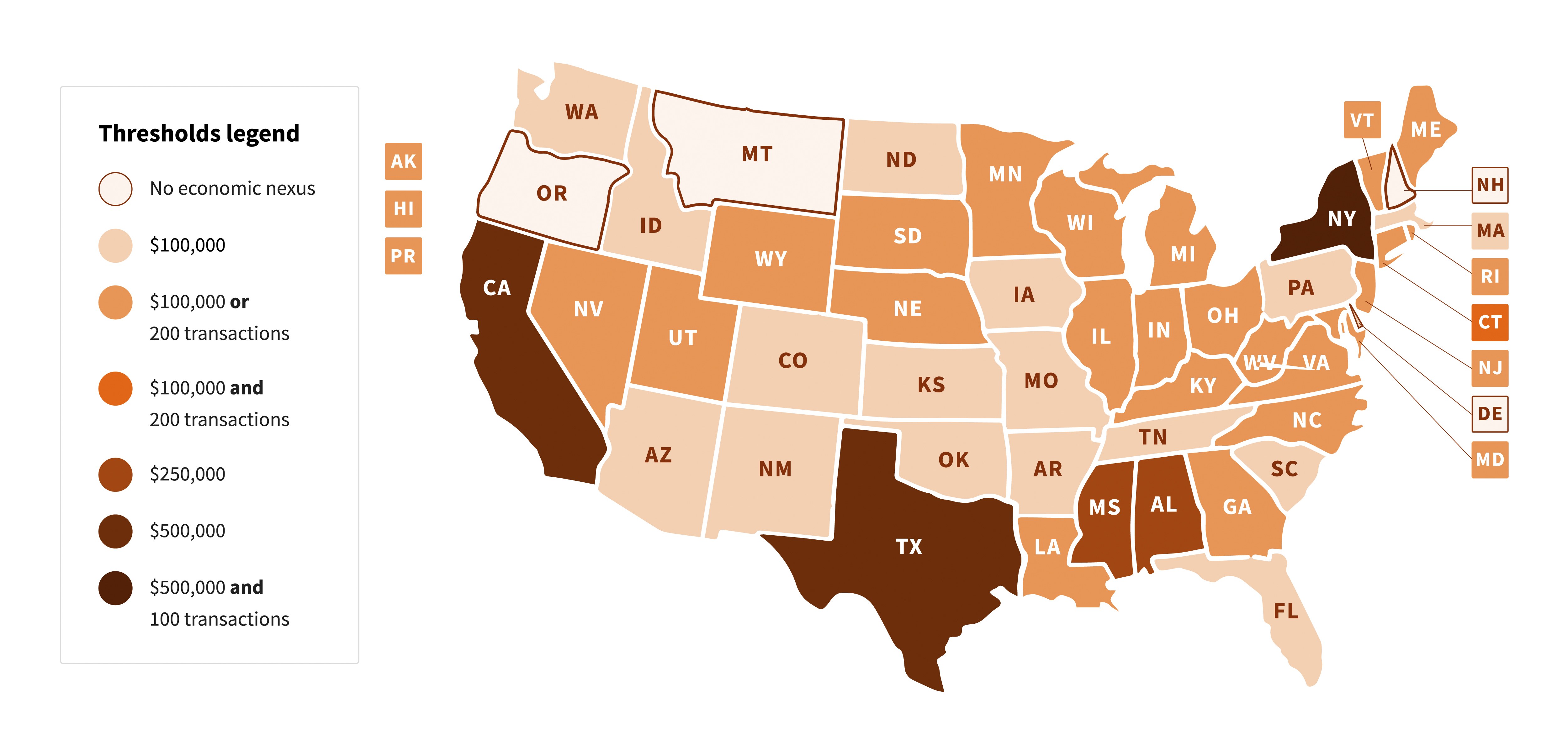
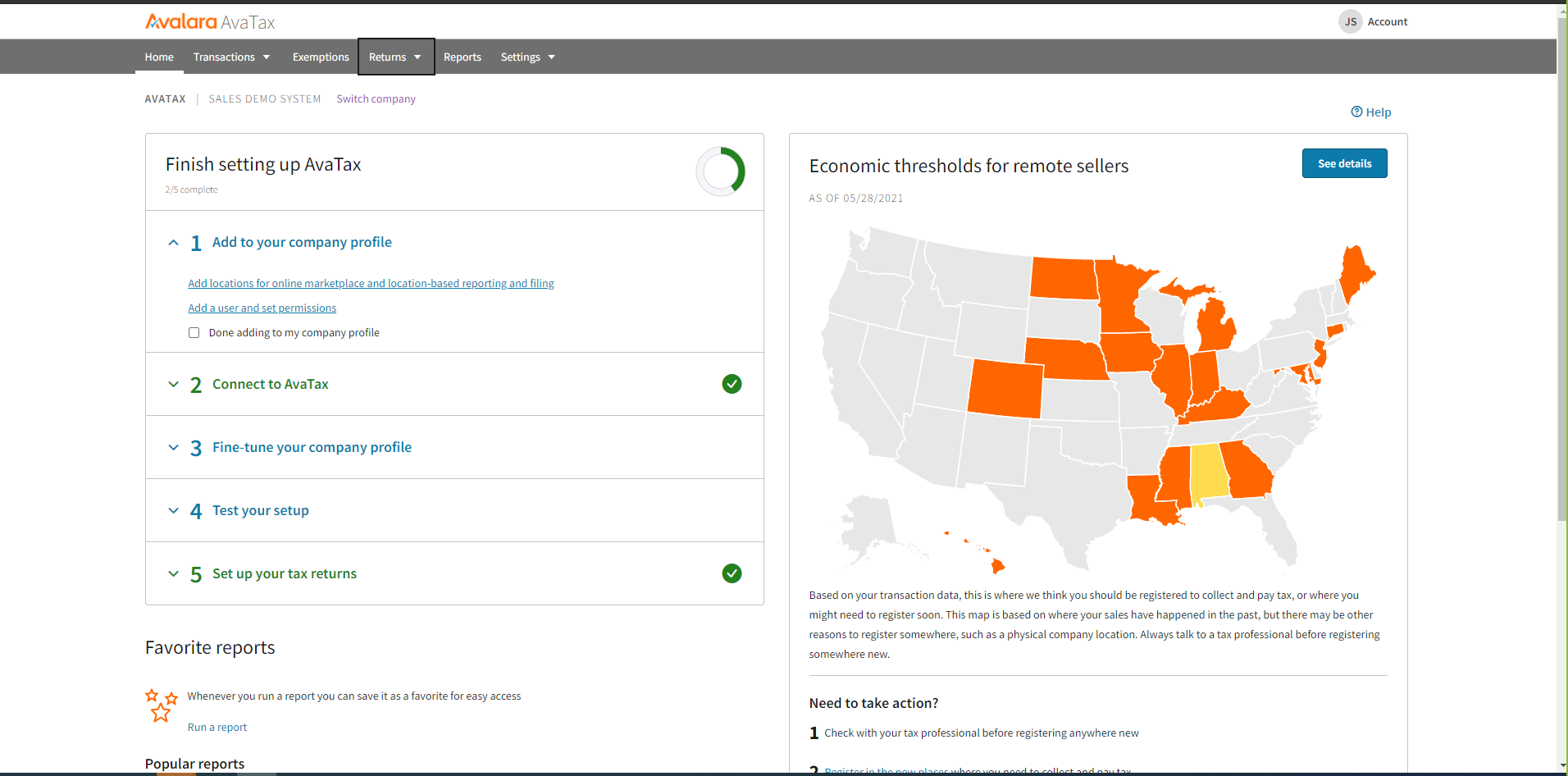
What is Sales Tax Nexus? Sales tax nexus refers to the connection between an organization and a state that requires the business to collect and remit sales tax on taxable sales. An organization must have sales tax nexus in a state to be obligated to collect and remit sales tax. Nexus can be established through various activities, including having a physical presence in a state, selling a certain amount in a state, or engaging in other activities that create a connection between the organization and the state.
Why is Sales Tax Nexus Important?

Failing to comply with sales tax nexus regulations can have severe consequences for organizations, like penalties, fines, and even legal action. It is essential to understand the rules for establishing nexus in each state where an organization operates and to comply with the requirements for collecting and remitting sales tax.

Sales Tax Automation Tools and Sales Tax Nexus

Sales Tax Automation Tools and Sales Tax NexusSales tax automation tools like Avalara can help businesses stay compliant with sales tax nexus regulations. These tools automate the sales tax calculation process, making it easy for businesses to accurately calculate and collect sales tax from customers. They also simplify the process of remitting sales tax to the appropriate tax authority.

Avalara offers a range of features to help businesses stay compliant with sales tax nexus regulations, including real-time tax rate calculations, tax exemption management, and tax reporting and filing. These tools integrate with various accounting and e-commerce platforms, which makes it easy for businesses to implement.

Sales Tax Nexus and Multi-State Operations

Sales Tax Nexus and Multi-State Operations

If an organization operates in multiple states, it is crucial to understand the rules for establishing sales tax nexus in each of those states. Each state has its own rules for establishing nexus, and it is essential to comply with each state’s specific rules to avoid penalties and fines.

Sales tax automation tools like Avalara can help businesses manage sales tax nexus in multiple states. These tools can automatically calculate the appropriate tax rate based on the rules for each state, simplifying the process of collecting and remitting sales tax.

Incorporating Avalara with your Fonteva Org

Avalara Avatax can be integrated to add tax components to the orders placed in the Fonteva store. When a product is added to the cart, the tax rates will automatically be retrieved based on the product configuration, and state of delivery of goods/services, and used in tax calculations. The integration will also write back the invoice details to Avalara so that any tax filings can be done directly through Avalara.

Benefits Of Using A Log Management System

Avatar photo August 26th, 2021 by

fusionSpan currently offers a multi-system software package called “fusionConnect,” marketed towards member-based organizations of all sizes. fusionConnect is a three-part software that allows the sharing of data within multi-system infrastructures. It includes Storage, Sync and Log Management.

Log Management is an important part of fusionConnect. If an organization has multiple applications running 24/7, syncing data accurately and having the process monitored via a log management system is crucial for operations. Loggly is the primary tool that fusionSpan uses for log management.

Loggly IconA log file is a computer generated data file that contains information about usage patterns, activities, and operations within an OS, application, server or another device.

How Loggly Works

Let’s say your organization leverages two separate platforms: a Membership System and an Email Marketing System. You have a data sync in place where a new member signs up, member data gets sent to your email system from the membership system. The issue you have is catching errors. There are times when sync errors occur, such as member address format is incorrect, record duplicates, record missing information and more.

Ideally, you’d like to catch errors as soon as they occur. Loggly is the solution you need to address this issue.

The way Loggly works is by tracking down logs scattered throughout different systems, and copying those same logs into its own storage within the cloud. With that data, Loggly generates dashboards and notifications for the user. An IT administrator can use Loggly to understand how much data each system is sharing, and how many errors are occurring in any given time.

Benefits of a Loggly-Based System

Two features that make Loggly shine is its ability to allow users to search for logs by keywords, and also allows users to build dashboards based on log data. For example, if you want to visualize how many member records were synced between Salesforce and WordPress, you can easily visualize the count of member records that were sent to WordPress, and then create a dashboard panel based on that count.

Loggly Can Connect To Any Log Source & Build Dashboards

Connecting Loggly to different systems is fairly easy. Infrastructures that Loggly supports are listed on its website. With a bit of tinkering, Loggly can connect to any log source or application. After the connection is set up, Loggly will automatically start collecting and indexing logs.

Easily Detect Anomalies & Get Notifications With Loggly

Within Loggly, users are able to set up a number of different monitoring criteria. If you hook up an eCommerce system with Loggly, Loggly will tell you how many orders were placed successfully, as well as how many order attempts failed.

Loggly

You can also compare different system logs under the same timestamp to figure out what exactly went wrong at any given point in time. Users can configure the platform to send email notifications if the number of errors exceed a certain threshold.

Use Loggly To Search & Analyze Your Log Data

Loggly allows a drill-down of Log data, which allows the user to type in a keyword and easily search for all logs related to a specific category. Users can tag their data based on the filter, as well as store their search results for future usage. Hovering over the log events will provide tooltips on log metrics, allowing users to understand the data more thoroughly.

Loggly & fusionConnect

As mentioned, fusionSpan leverages Loggly as a core component of our fusionConnect solution. With every data sync or microservice it builds, a Loggly connection is put in place to closely monitor the sync or service. fusionConnect helps associations link their multiple systems together to ensure information is shared. Loggly ensures that those links are monitored 24/7 and notifies users whenever it detects any kind of failures.

fusionSpan assists associations with the setup of both fusionConnect and Loggly. Should associations already have a sync solution in place, they can still enroll the service of fusionSpan to actively monitor those solutions for them. This way, instead of worrying about infrastructure, associations can focus on the more important aspects of their business.

fusionConnect Diagram A Loggly-based solution benefits associations greatly by reducing the time it takes to identify issues within their IT infrastructure. With Loggly, users are able to see all their logs in one place, and there is no need to log into each individual solution or install proprietary agents.


Take Your Member Org To The Next Level Today

Loggly is an amazing monitoring tool offered as part of the fusionConnect software stack. Our developers at fusionSpan use Loggly daily to get updates on the solutions we’ve built for our clients.

Associations that are interested in fusionConnect can request fusionSpan to provide certain services with Loggly included! If you’re interested in building a highly responsive system, contact the fusionSpan team to learn about scalable solutions for your organization.

New call-to-action

Personalizing Content For Your CRM Driven Website

Avatar photo April 15th, 2021 by

This blog was originally published on September 13, 2016.

The first interaction most people have with an organization is through their website. Having an attractive website that is easy to navigate and well organized to engage effectively is essential for every organization. The latest web technologies enable developers to create attractive websites and, with some effort, organize content that is easily accessible for customers. But nowadays, a well-designed website isn’t enough for most users.

The User Comes First

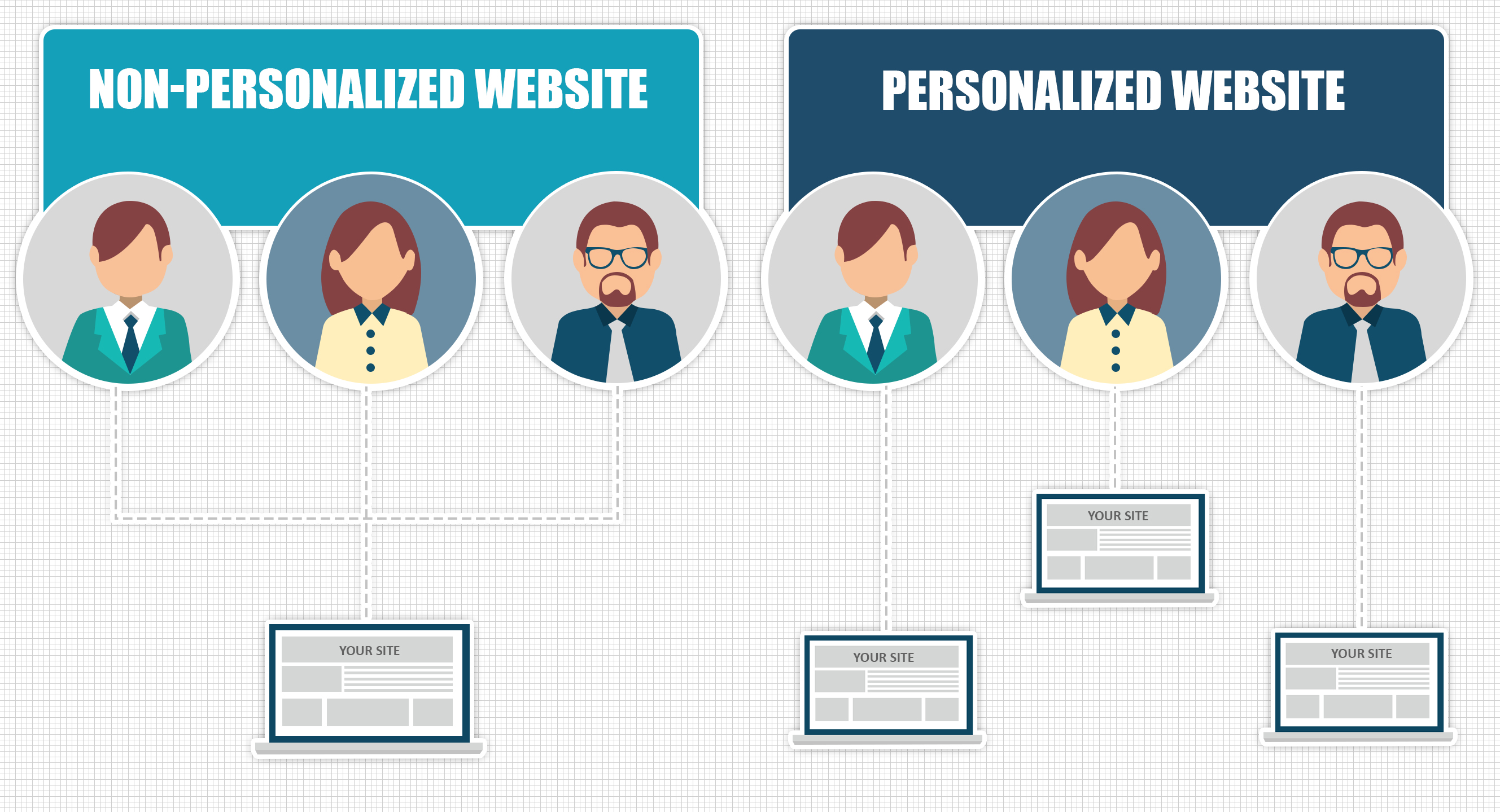
Because of sites such as Amazon and Google, customers expect the site to adapt to them. To meet those expectations, organizations must deliver websites whose layout and content are tailor to individual users. This is what we call a “context-sensitive website” or “personalized content.”

Certain attributes, like the user’s geographical location, platform (desktop or mobile), or even technology (Operating System, Browser, etc.), are obtainable with current web browser technology. Most organizations have much more information on their customers that could personalize the customer’s experience. Unfortunately, unless the organization has a CMS built into their customer database, they cannot leverage the information.

Download Our Data Sheet

We specialize in developing CRM driven websites. See how fusionSpan can help integrate your association website and Salesforce Community Portal with SSO to create a uniform look and feel!

New call-to-action

That’s where fusionSpan comes in. Our CRM integration solutions — where we integrate websites with the backend of a Customer Relationship Management (CRM) system or Association Management System (AMS). We also know a lot about the user currently using the website (for users in your CRM or AMS as Members or Customers). These include:

Customer Attributes

The customer database contains a lot of data on an individual, including name, address, organization affiliation, and past purchases. We can use these attributes to personalize the website for that specific user more accurately. For example, if we know that a user is located in a certain geographical location, and there is a conference that is being organized near that location, we could alert the user and prompt them to attend.personalize

Membership Status

We will also know if a website user is a current member of the organization, if their membership is up for renewal, or even if that user is not a member. We could prompt a user to sign-up (or renew) for a membership right from the website in such cases. We could also advertise early registration specials for current members. Since doing so on the website is a lot more convenient than remembering to mail a paper form, this could make the entire process much more seamless for members to sign up and renew their membership, boosting membership numbers overall.

Event Registration

We also know the events that a customer has registered for, and that information can drive the content on the website. For example, if a customer registered for an event last year but hasn’t done so this year, we could display the event details and registration link for that event on the homepage banner but omit the banner for someone who has already registered. Instead, a customer who has registered for an upcoming event might have related news around the event featured more prominently on the homepage.

Event Registration

Contact fusionSpan For More!

In each of the examples above, the common theme is that the entire website becomes more dynamic and tailored for a particular user or group. We could also call this “engaging content” because the integration will make the website more interesting to your customers, increase traffic, boost event attendance, increase membership retention, and increase customer interaction.

If you would like to learn more about our out-of-the-box CMS-CRM integrations, feel free to reach out to our talented team today!

New call-to-action

Building Pipelines with Tibco Cloud Integration

Avatar photo February 11th, 2021 by

TIBCO Cloud Integration, formerly known as TIBCO Scribe Online, is a cloud-based data integration tool that helps businesses sync data between two existing applications. TIBCO Cloud Integration has a wide variety of connectors, allowing it to extract data from HubSpot, Google Analytics, Salesforce, Amazon Redshift, Amazon S3, Dropbox, databases, and much more.

While TIBCO Cloud Integration offers code-free customization, the fusionSpan team has been leveraging code to get the most out of the TIBCO Cloud Integration. Successful projects include creating pipelines using API calls, integrating pipeline notifications to Slack, automating FTP uploads, and writing complex SQL processes.

In one of our projects to send data from one system to another, we leverage SQL and the TIBCO Cloud Integration to ensure quick and efficient data transfer. The pipeline we built allows data to go through multiple stages of transformation before reaching its final destination.

So you might be wondering, how are these pipelines built with TIBCO Cloud Integration?

Creating the Staging Area

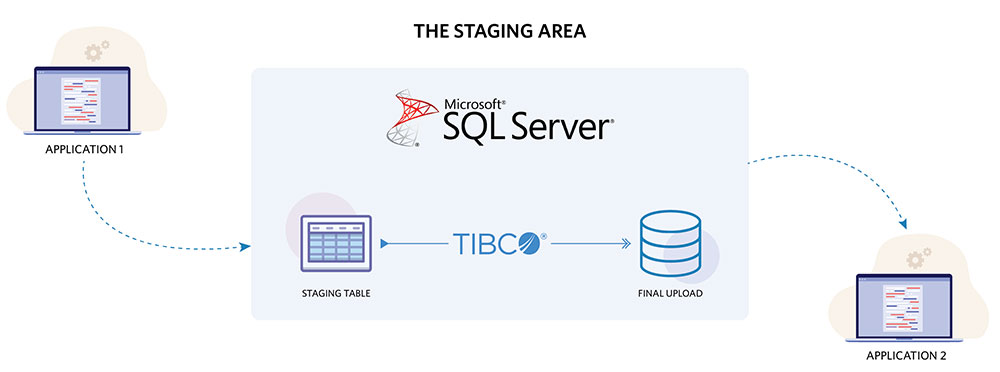
Before we start creating our ETL processes, we need to ensure that we have a staging area to hold the data. Since we were using SQL to transform our data, we chose Microsoft SQL Server as our staging area. Within our staging area, we create two databases, one to hold data in the process of being transformed and the other to store data ready to be uploaded.

sql Server

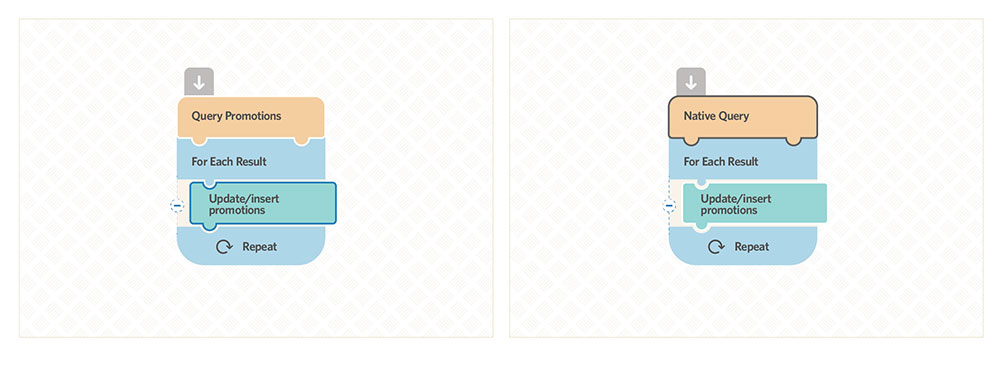
Once the staging area is set up, we start building flows that transform the data. Within Tibco, data operations are controlled by blocks; you can set up a data flow by adding filters and quickly calculating measures through clicking and dragging blocks. To create more complex data transformations, embedding SQL queries in blocks seems the most efficient way so far.

In the screenshot below to the left, we have an example of an extraction flow. The flow queries (extracts) data from the starting application and stores the data in the staging table called “1.Promotions”.

After running the flow, we start transforming the data by utilizing native queries, as shown in the screenshot below to the right. We write the SQL code and embed it in the native query block to conduct operations such as filter, join, group by, unions, case when.

This flow will eventually transform the data within the staging table and store it in a new table called “2.Promotions”. Once that is complete, we copy the contents of that table to the “Final Upload Database.” Simply put, our data goes through these stages:

“Data Source” → “Staging Table 1” → “ Transformation via Native Query” → “Staging Table 2” → “Final Upload Table” → “Destination App”

light version

If more transformations are needed, we rinse and repeat, adding more flows in Tibco and more tables in the staging area.

Net Change vs. Data Dumping

To ensure our data flows don’t take more than an hour or two to run, we utilize net change and data dumping to increase flow processing speed.

For net change, Tibco Cloud Integration gives users the option to progressively load and update data provided that a record change date or change data capture (CDC) exists. Every time Tibco runs a flow, it will bookmark the latest date that data was processed, and when new records come in, it will only process those new records.

By enabling net change, we avoid having Tibco compare millions of records to what already exists in our staging area. However, there are scenarios where a data source does not have a record change date; in that case, we would use data dumps instead.

Within Tibco, a “create” block allows users to process data in batch, by default, 2000 records per batch. This increases pipeline efficiency significantly. Before dumping, we utilize a native query to truncate the tables within the staging areas first. Once all data is cleared, we run the create flow to allow records to repopulate those tables with new data quickly. With Tibco, we can dump millions of records into the staging area in just a few minutes.

Documentation and Notifications

Careful documentation of what happens in the flow is considered best practice. Tibco offers blank fields where users can fill out the information about the flow process and explain what is happening during the ETL process. However, in addition to adding explanations in Tibco flows, we also recommend creating shared documentation that contains a list of all flows, their functionalities, and their runtimes. This allows you to see all ETL processes in one list and pinpoint necessary changes quickly.

Regarding notifications, Tibco users will be automatically notified of any flow failures. Take the time to go over any flow failures since data sync errors can cause many problems once an application fully relies on it.

Summary

Tibco Cloud Integration is a great tool that offers users options to connect to different data sources and rapidly build pipelines. As a Platform-as-a-Service (iPaaS), it empowers more people within the organization to utilize data pipeline processes, giving organizations an efficient option to sync data across all boards. fusionSpan, on the other hand, has been using Tibco Cloud Integration in conjunction with our scripts and code to help clients with more advanced data integration solutions. Whether it’s combining data sync with API calls, or creating a complex pipeline with SQL, or automating an FTP upload process, fusionSpan has been able to achieve all this with Tibco Cloud Integration. We look forward to seeing more Tibco features and improvements offered in the future.

New call-to-action

Single Sign On with Fonteva and WordPress For Members

Avatar photo July 24th, 2020 by

Salesforce solutions and WordPress are two of the most widely used platforms globally, and that is certainly true for membership-based organizations. The ability to create a seamless, personalized experience across both platforms requires a type of integration commonly referred to as Single Sign-On (SSO).

For fusionSpan and our customers, this process can take one of several forms, but the basic tenets of each are rooted in two principles:

1) Expertise in the platforms involved (including Salesforce’s Fonteva platform and WordPress), and

2) Best practices for integration

While there are “out of the box” plugins available for SSO, the complexity of some digital spaces and desired experiences sometimes require a specialized solution. The following highlights our method for a custom SSO solution that leverages standard capabilities.

Single Sign On with Fonteva and WordPress for your Members

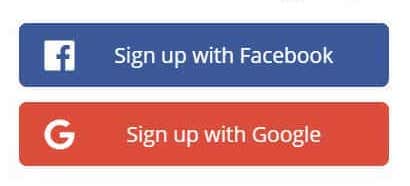
As we know, SSO is an authentication scheme that allows a user to log in with a single set of ID and password credentials to access any of several related, yet independent, software systems. As we have mentioned in previous blogs, SSO can take the form of a “Sign up with Google” or “Log in with Facebook” action button on your browser page.

Security Assertion Markup Language (SAML) is the technique used which is an open standard for exchanging authentication and authorization data between parties. In particular, between an identity provider (a trusted provider that lets you use single sign-on to access other websites) and a service provider (in this case, one that needs the authentication from the identity provider to grant authorization to the user).

user

In the following steps we will explore the process to leverage SSO connection between Fonteva and WordPress, where Fonteva acts as an identity provider (IdP), and WordPress acts as a Service Provider (SP).

Setup Fonteva as an Identity Provider

  • Log in to Salesforce and navigate to Setup.
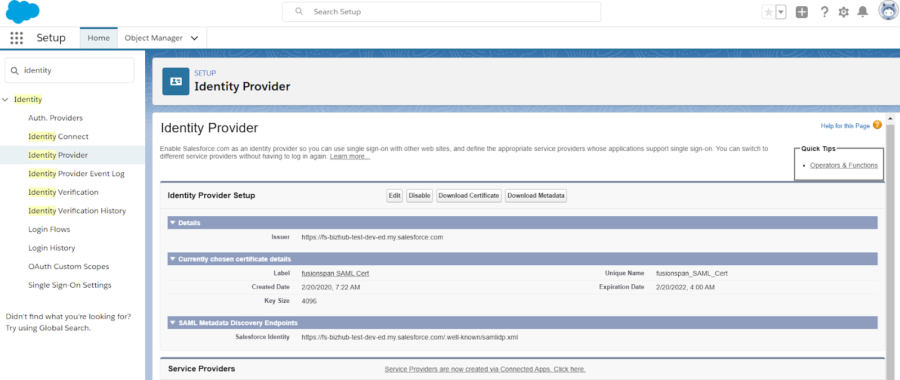
  • From the left menu, navigate to Security Controls » Identity Provider, present under Administer menu option.
  • Click on the Enable Identity Provider button. After enabling the Identity Provider, you should be able to see Salesforce metadata endpoints and certificate details. Click on the Download Metadata to get the information used in WordPress settings to do the Identity Provider set up.
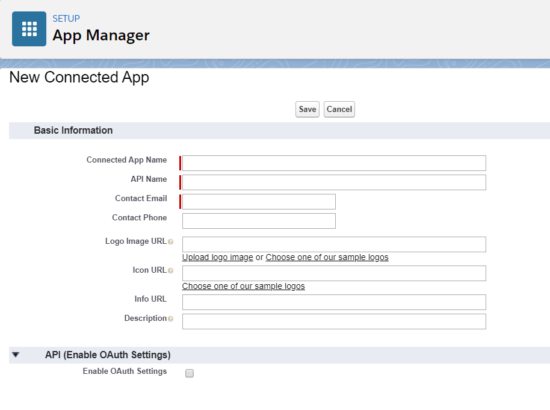
Enter Connected App Name, API Name, and Contact Email.
  • Under the Service Providers Section, click on Service Providers are now created via Connected Apps. Click here.
  • Enter Connected App Name, API Name, and Contact Email.
Enable Identity Provider button
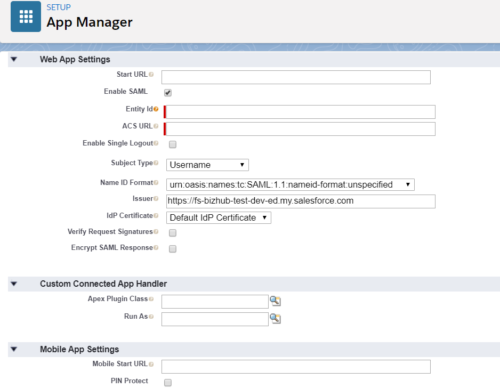
  • Under Web App Settings, check the Enable SAML checkbox and enter the following values:
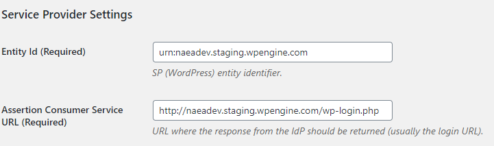
    • Entity ID: SP-EntityID from Service Provider Metadata tab of the plugin (urn:)
    • ACS URL: ACS (AssertionConsumerService) URL from Service Provider Settings tab of the plugin
    • Subject Type: Username
    • Name ID Format: urn:oasis:names:tc:SAML:2.0:nameid-format:persistent
  • Click Save.
Name ID Format: urn:oasis:names:tc:SAML:2.0:nameid-format:persistent
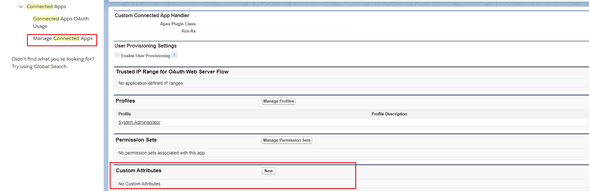
  • Now from the left menu, under Administer, select Manage Apps » Connected Apps. Click on the App you just created
  • Under the Profiles section, click on the Manage Profiles button and select the profiles you want to give access to login through this app.

Configuring WordPress as a Service Provider

  • Setup SP entity identifier
  • Setup URL where the response from the IdP should be returned (usually the login URL)
Configuring WordPress as a Service Provider
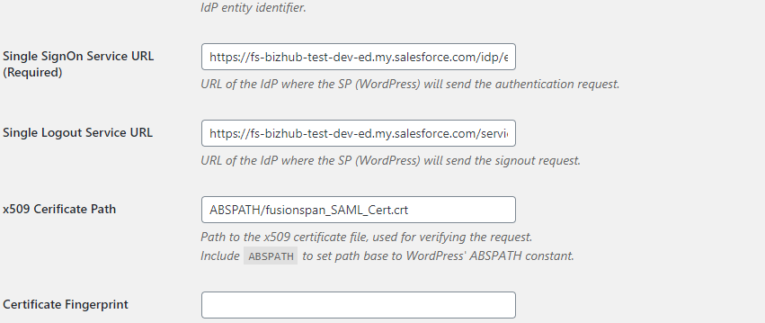
  • Setup IdP entity identifier
  • Setup URL of te IdP where the SP will send the authentication request
  • Setup URL of te IdP where the SP will send the logout request
  • Path to the x509 certificate file, used for verifying the request
  • If not using the x509 certificate, then use the certificate fingerprint
  • Specify fingerprint algorithm
Specify fingerprint algorithm

If we need to get any custom information about the user (i.e. the member status), then we would need to make some customization in the WordPress SAML Auth plugin (to include the custom information from Fonteva), and then map it as a user role in WordPress. Any custom information required needs to be set as a custom attribute under the Connected App that will be used on the WordPress site.

Connected App that will be used on the WordPress site

Leverage fusionSpan for your Salesforce Org today!

After going through these steps, SSO should be enabled for your Salesforce org. However, as mentioned earlier, the complexity of some digital spaces and desired experiences sometimes require a specialized solution. If your platforms require extra attention, do not hesitate to reach out to fusionSpan for further assistance!

Contact Us

Development Tips For Your PowerBI Dashboard

Avatar photo May 21st, 2020 by

PowerBI is a powerful tool that is able to handle both data transformation and data visualization. In recent years, the developers behind PowerBI have introduced PowerBI online: a new cloud solution where offline PowerBI Desktop users can upload their dashboards and share it with other licensed users.

While the new solution is quite useful, PowerBI does contain certain limitations that Desktop users should be aware of. Check out the following tips on what Desktop users should pay attention to before uploading their dashboards.

1: Try to Limit How Many Steps You Include in a Query

Regarding dashboards, PowerBI Desktop users are only limited to the computing power of their desktop PC. Meaning they can run as many query steps as possible, and would only run into performance issues when their PC could not handle it.

The same cannot be said with PowerBI Online. If your query includes 15 steps for PowerBI Desktop, then expect errors or long run times once you upload your dashboards to PowerBI Online. The Online version relies on Cloud Computing to run its queries, and all services provided below “Premium” usually have limited capacity.

From personal experience, try not to include more than 10 steps per query.

2: Shrink Your Data to Increase Refresh Speed and Save Space

Data pulled from a ERP or CRM system can be massive, with millions of rows of data and up to hundreds of columns. If you want your PowerBI Online dashboards to refresh quickly, then it’d be best to delete all unused columns and limit how many rows you import. For instance:

  • if you have 20 years of data pulled in, consider limiting your data to 5 years of data
  • If you are connected to a SQL database, create a “view” that summarizes that data in the database for you first then import the summarized data into PowerBI.
  • If you have 300 columns, and only use 5 columns for your calculations, delete all the remaining columns or utilize the advanced query option to only pull in data in the 5 columns if you are connected to a SQL database.

Check your online storage space often to make sure your dashboard isn’t pulling in too much data, which would exceed your Data Capacity Limit of 10 GB. Your dataset has a 1GB limit so make sure your dashboard doesn’t hit that limit as well when pulling in data.

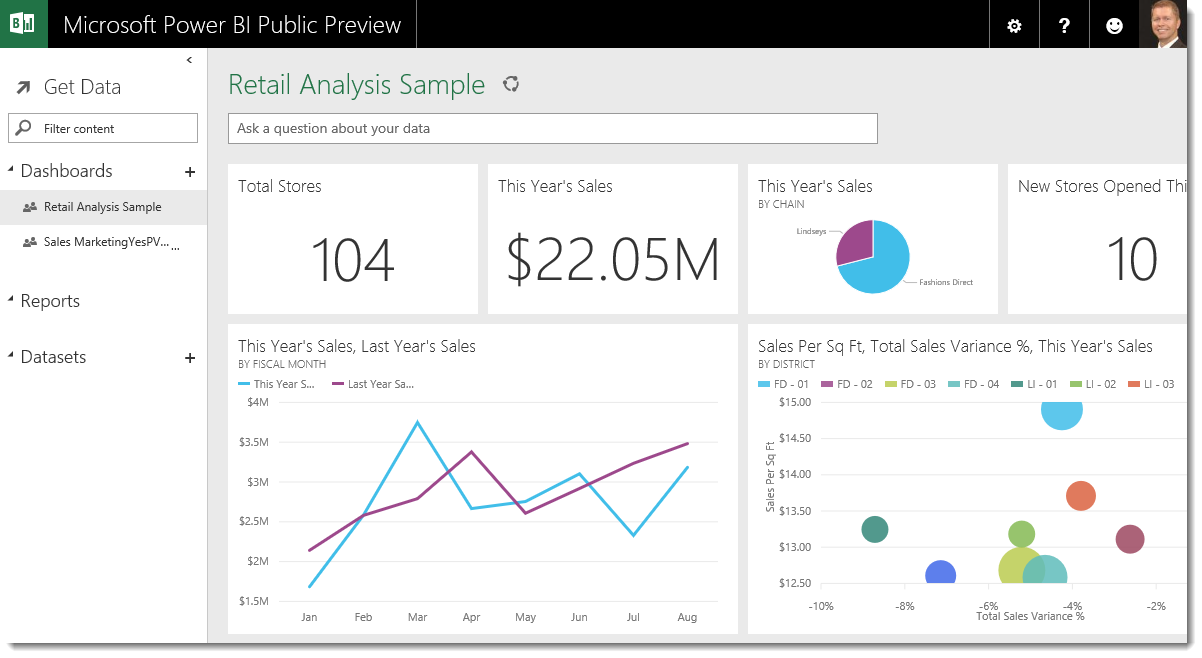
powerBI dashboard

3: Simplify Your Dashboards and Spread Content Out

One thing that may also slow down the performance of PowerBI online Dashboards are DAX formulas. While DAX formulas take up very little resources, if there is an alternative to DAX, like built-in table features, use those instead of the DAX. Having too many DAX formulas in your dashboards can drastically slow things down.

Another thing to take note of is to not squeeze all your panels in the first dashboard. Having too many panels rendered in the first dashboard page not only slows things down but also makes it hard for the user to distinguish the information in the dashboard, as everything is too crammed together. Ideally only include three to four visualizations in each dashboard page. Also, include filters in each page to allow users slice and dice their data.

4: Subscribe to PowerBI Newsletters

PowerBI is a tool that’s constantly evolving. Subscribing to relevant newsletters gives you insights for new game-changing features that have been added. For instance, PowerBI Online now includes dataflow, which is an ETL tool that works similarly to PowerBI Desktop’s query/transform mode. This allows more flexibility in your data cleaning process.

Consider checking out the official Microsoft PowerBI site to register for their weekly updates. Other resources like sqlbi and PowerBi Weekly offer regular tips and white papers surrounding the platform. Brushing up on new updates and tips can help you fully harness the power of your system.

5: Always Build a Proof-of-Concept Before You Build the Real Thing

Always Build a Proof-of-Concept Before You Build the Real ThingProof-of-concept is to make sure that the PowerBI Online App you are building includes everything you need for it to work. Not doing a proof-of-concept may cause you to miss certain key issues in the app development process. For example, if you want to schedule PowerBI to refresh without using PowerBI DataFlow, then you have to host a gateway on a secure windows PC. Thi is so that the data is able to be imported through that gateway to your PowerBI online app. If you had not tried this out as a Proof-of-concept, you might have assumed that uploading the PowerBI app is enough to schedule your data refreshes.
In all, PowerBI developers not only need to make sure their metrics are calculated correctly, but they also need to think about time and space. Time refers to the time it takes to load a dashboard; Space refers to the ETL process: how to clean and store the data needed to be used in their metrics.

Thus it is important for them to pay attention to the features and limitations of the apps they are using. It is best to test things out as often as possible, go through the app’s documentation, and plan out the dashboard building process.

Accelerate Salesforce Org with Lockbox Payment Applicator

Avatar photo April 23rd, 2020 by

What is Lockbox?

For those associations that still recieve checks mailed to your organization’s physical address, you have had to recently address: who goes in to collect the mail, logs the checks, and what the next steps are to deposit the checks and apply payments against orders in your CRM. If your organization uses a lockbox functionality, which is really just a PO Box accessible by the bank, you have just seen your return on investment with a low risk to human capital. The bank opens the mail, logs and deposits the checks, then provides you with a detailed report tying the customer to the order and payment amount.

Rather than applying payments one by one, fusionSpan has developed an online payment applicator built on the Salesforce platform. The Lockbox feature allows organizations to streamline posting payments into your Salesforce CRM. In fact, if your check logs could replicate the data template received from Lockboxes, this could streamline the process for you as well.

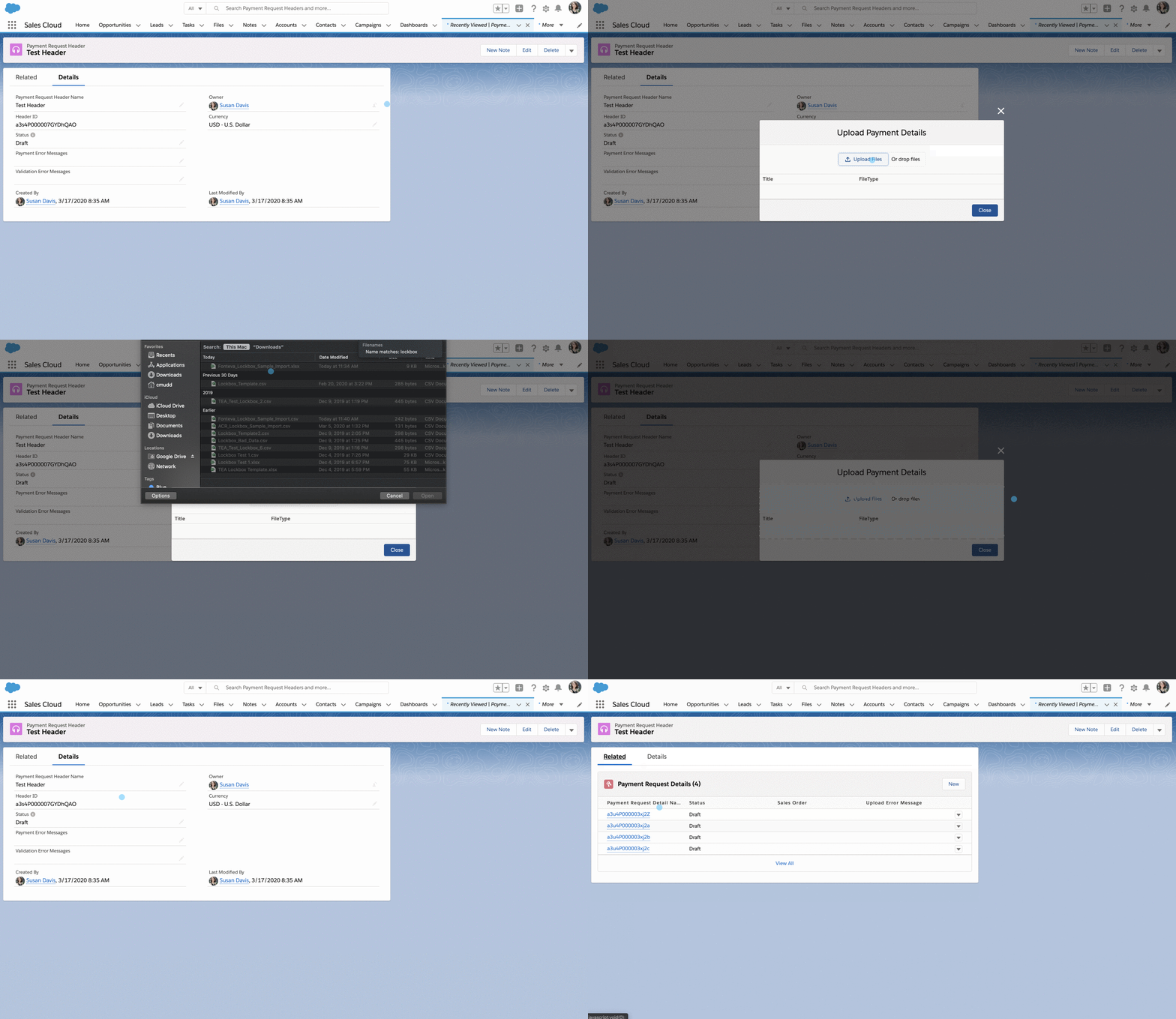
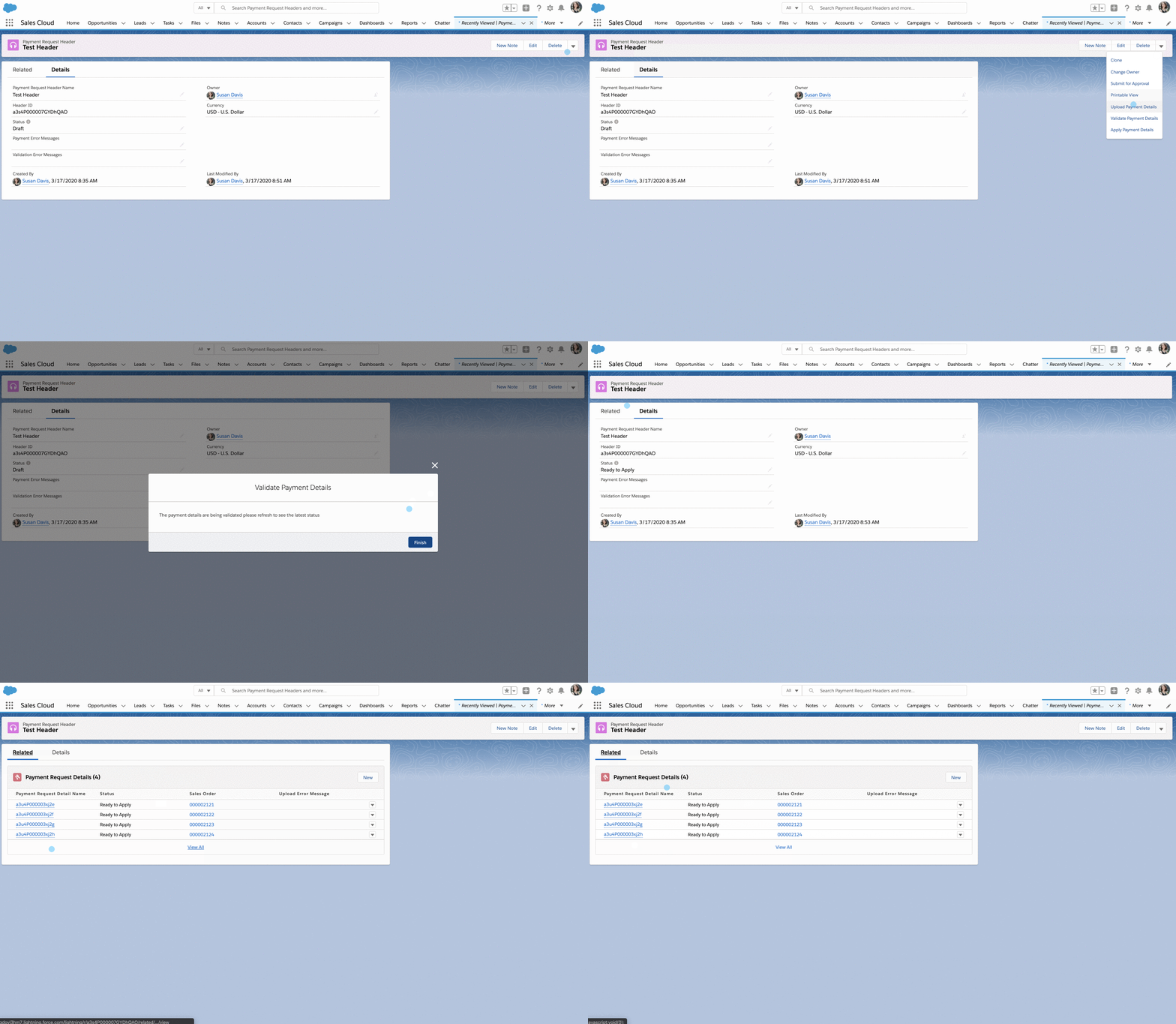
Through our custom Salesforce object, Payment Request Header, one can upload, validate, and apply payment to multiple orders with just a few simple clicks! The product essentially provides ease of access for the user to apply and receive payments in mass to invoices, and has been designed into three simple stages: Import, Validate, and Apply.

Import

Built with the user in mind, Lockbox can be used with a variety of CSV and Excel formats. In essence, the product takes these files supplied by the bank to automatically pay orders related to that file. We have created our Lockbox to use a custom metadata type, allowing your Salesforce Admin to easily configure your file format by criteria such as column index. Therefore, if your organization updates your file structure over time, there is no issue.

Furthermore, the system uses packaged custom objects for uploading Lockbox files (meaning the user doesn’t have to create anything, we create the object structure for transferring file details into Salesforce). This allows us to upload all data and separate the good from the bad – misformatted rows, orders that have already been paid, etc. in the second stage: Validation.

Import

Validate

fusionSpan has developed a very customizable platform to allow the user to choose which fields are brought in and how they are validated during this phase.Using batch apex, the system can process up to 50 million orders at once, supporting almost any file size.

Our standard verification process currently includes features such as identifying the order of the payment within the system, validating the payment amount, verifying that two payments do not apply to the same order, and more. Furthermore, while we do have our standard code, the system allows custom validation. This allows the user to write their own custom apex class for handling the validation of each payment from the lockbox file.

Checking each field off the customizable fields provided, the lockbox application will mark all bad data with error messages. The system even allows you to run reports on all rows from your Lockbox file that were improper. An end user can easily validate each row of payment received in the file with the click of a button. Once validated, payment request details with errors will be flagged for review and payment request details without errors will be ready for the last stage, applying payment.

Import

Apply

The final step is applying payment! Once your payment request details are ready for application, you press the button and all payments are processed in the system. Staff will be able to click one button to satisfy all payments and create necessary data in the system for a whole file, as opposed to manually applying payment to each order for each payment. Our clients that have implemented lockbox said this has saved hours or even days of work.

Payment Application can take some time since the lockbox must interact with payment gateways and process any additional data necessary from the purchase. All integrations relying on orders in the system will be able to perform their standard functionality, and the system will create an automated generation of any receipts or transactions from the user paying their order.

Schedule a Demo Today!

As other organizations have begun to create similar products, we have developed our Lockbox with the user in mind, allowing for speed and ease of use. fusionSpan is cognizant of the fact that different customers have different needs, and our system gives leeway all the way from the standpoint of the imported fields to the validation checklist. We have provided extensibility in addition to standard functionality built into the system, and this has been a very popular application since it’s recent development. Schedule a demo with us today to see how Lockbox could be a fit for your organization!

Schedule Demo

Accelerators to Empower your Salesforce Organization

Avatar photo April 9th, 2020 by

More than Implementations

“Bridging Gaps Through Technology” is not just a catchy tagline we like to say – it is words that drive our everyday work. While we help bridge the gap between organizations and their members, we also aim to provide our customers with the best user experience possible. As we routinely look for ways to stay ahead of the curve and respond to our customer’s needs, we have created the Association Power Pack (APP) and the Membership Power Pack (MPP).

The MPP and APP were created with one goal in mind: putting more power and customization in the hands of the user. The MPP, built for the Fonteva platform, empowers associations by offering controls around how their members see, pay, and renew their memberships. The APP provides associations with rosters, an Experient integration, and template builder on their current Salesforce platform. While they are two separate products, both are highly customizable and give you the power to edit your system.

Membership Power Pack

Membership Power Pack The MPP acknowledges how busy trade and professional society members are by offering associations high levels of customization when it comes to the subscription renewal process. Built for Fonteva platform users, MPP customers may set up non-primary contacts to pay for membership, which means that any predetermined person can login and pay. This is particularly useful for situations where the membership account is held by an unavailable professional with a supporting assistant.
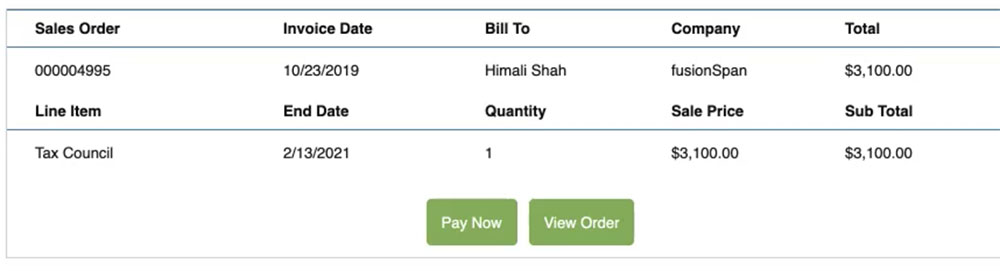
Members or end users are not the only group that benefits. Association administrators are able to define on an item instead of subscription level:

  • Who is allowed to see and renew the membership from the organization
  • When renewal can happen with ‘renew days before’ and ‘renew days after’
  • Terms and conditions, so members must accept terms and conditions before paying
  • Ability to customize 5 fields from sales orders and 5 fields from sales order lines for outstanding orders plus a “show more” option
  • Ability to add buttons to the component like “View Order” or “Visit Website”
  • No disruptions to the Fonteva payment workflow
  • No additional configuration after initial setup


Members or end users are not the only group that benefits

Additionally, the MPP has been a fit for many users because members are connected to the original proforma invoice generated by Fonteva’s platform, instead of creating an extra renewal invoice. This reduces confusion and clutter with outstanding proforma invoices and also eliminates the need for follow-up by association staff.

Association Power Pack

Association Power PackBuilt 2 years ago with the lightning experience in mind, the APP is a powerful set of modular features. In contrast with the MPP, these features may be used by any Salesforce customer and are not limited to Fonteva platform users. Easily bring in critical information into the association and reduce the need for staff work!
One of the strongest tools bundled into the APP is roster management. The roster is a dynamically generated table, which enables associations to display any object in Salesforce to members and/or portal users using APIs. Offering a high level of customization, administrators are able to set:

  • Who can view the roster
  • What fields are displayed
  • What fields are editable
  • If new records can be added
  • Custom text above or below the roster for instructions

Many of our users have found success using the roster feature for functions like:

  • employee/ affiliation management
  • conflict of interest application
  • Continuing Education Unit (CEU) tracking

This has drastically cut down on support time and eliminates the need to contact us for small edits to the system.

The APP was also built with Experient in mind, offering a complete end to end bi-directional integration with the Experient event management system. Not only does this offer a daily sync with your data, but it also allows you to define where that information goes in your database. This feature, along with the roster management, makes the APP a must have product for your organization.

Schedule a Demo Today

Even though these products were rolled out two years ago, they are constantly updated and fully outfitted to meet our customers needs. We have created these products by putting the power in our users hands, allowing them to decide how to run their organization the best way they see fit. Don’t hesitate to reach out for a demo exploring how the APP or MPP could be a fit for you today!

Your next implementation should be a SSO System

Avatar photo February 13th, 2020 by

What is Single Sign On?

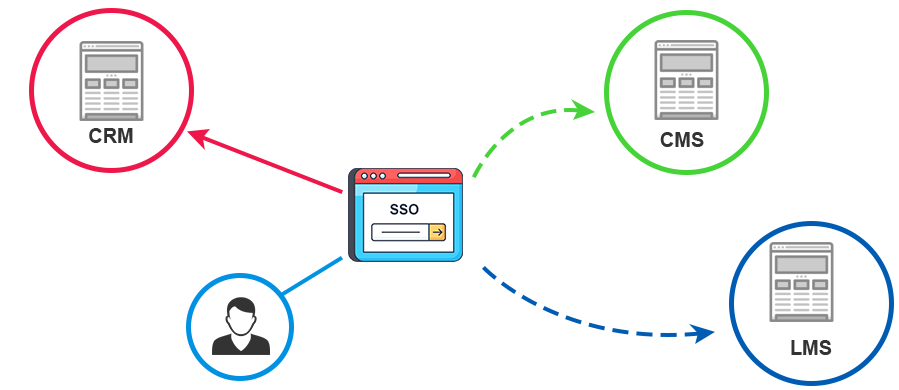
Single Sign On, or SSO, is probably a phrase or acronym that you have seen a lot. To understand what it is in the most basic sense, consider this analogy: the internet is like a shopping mall, and each storefront a domain. Now, each time you enter a different store, you are immediately asked to provide your identity, and again asked to confirm that identity upon checkout. After visiting more than a couple stores, this process would probably get pretty frustrating, right?

Single sign On

SSO is an access mechanism that allows users to securely authenticate with multiple applications and websites by logging in only once. It permits a user to use one set of login credentials (e.g., name and password) to access multiple applications, and furthermore helps to mitigate the management of multiple usernames and passwords.

A well known example online is the “Login with Facebook” button that you see when accessing various websites. Instead of going through the process of creating a new password and filling out personal information, a user can just create and access an account using their existing social media credentials.

Current Landscape

Our experience has been that it is fairly common for associations to use their AMS/CRM as the central hub of all information related to their members. This often includes user logins, making the CRM the SSO solution for the organization.

This is convenient but not desirable in the long term, due to the following reasons:

  • Single Point of Failure: SSO solutions need to be very reliable, because if they are offline even for a few minutes, you have locked out users on all your IT systems. Most AMS solutions are not setup in a High Availability (HA) environment.
  • CRM’s are not designed to be SSO solutions So simple things like user registration and password resets are not as user friendly as an SSO solution should be.
  • Vendor Lock-in: Most systems encrypt passwords with one way hashing. If you save all user passwords in an AMS and then wish to migrate to a different AMS/CRM in the future, you cannot move the passwords and will typically need users to reset their passwords again. Migrating thousands of users is not something for the faint of heart!
  • Security Standards: Most SSO solutions are designed with more robust security like Multi Factor Authentication (MFA), group policies etc., which most AMS’s do not support.
  • Open Standards:  SSO solutions have built-in support for open and well established industry standards for authentication and authorization like SAMLOAuth and OpenId Connect. Which means that the job of integrating other systems with SSO is easier with a standards based system.
This is often well understood but just generally accepted as a trade off for simplicity. However, as associations move from monolithic AMS solutions to best of breed systems, it’s important to think of an independent SSO solution as a must have. The level of effort and cost is often times less than having all systems talk to the AMS.

Note about Open Standards

Note about Open Standards Some systems don’t support open authentication and authorization standards like OAuth, OpenID or SAML. While you may have existing systems that don’t support these standards, it should be an important consideration when picking new systems.

Also when a vendor says we support SSO – its important to ask if they support SSO where users passwords are not stored in their system. Often times the SSO that vendors support is the ability for other systems to use their authentication API, and not the other way around.

Single Sign On Solutions

There are many SSO offerings, some of them completely cloud based. We like:

Auth0 (www.auth0.com)

Auth0 We like Auth0 because its a very feature rich identity platform and surprising affordable (the base version is free to use). It provides a lot of flexibility in integrating backend systems and customizing the user experience.

One great feature for associations is that it has a migration feature, where users can use their existing credentials and slowly migrate over time to Auth0 from the current AMS/CRM user sign on process.

Gluu (https://gluu.org/)

GluuWe are big proponents of open source software here at fusionSpan, and Gluu happens to be an Open Source SSO solution which is completely free to use. However, there is an option to upgrade to the premium version that comes with support. Gluu can be deployed very easily on any of the Cloud Service providers like AWS, Google Cloud etc. One trade off is that you will need someone to manage that hosting for you or your organization.


Okta (www.okta.com)

Okta Okta is the leading commercial SSO solution out there, and fusionSpan is even an implementation partner. Okta already has connectors for most web applications and can auto import and sync data from a large number of systems. This allows you to keep all your user details in an external system like Salesforce, and still use Okta as the single sign on.

Okta does a lot more than SSO and can handle things like user provisioning to multiple applications (so if you add a user in your AMS, it automatically gets created in the LMS). and even has features where desktop logins in your organization can be tied to a single login.

Note about Salesforce

Note about Salesforce

While Salesforce does provide implementations for OAuth and SAML and can be used as your Identity Provider, there is a catch. Salesforce logins are not free. Even community logins, while cheaper than regular users, come at a cost. If most of your members are logging into your Community site, then cost is not the major issue.

If your members are simply logging into systems like your website using Salesforce, then implementing an independent Single Sign On solution can be a substantial cost saver. The savings, along with the advantages listed above, make the decision to implement an independent SSO a no brainer.

Making the Case for a Business Hub for your Association 1

Avatar photo May 13th, 2019 by

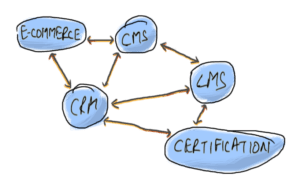
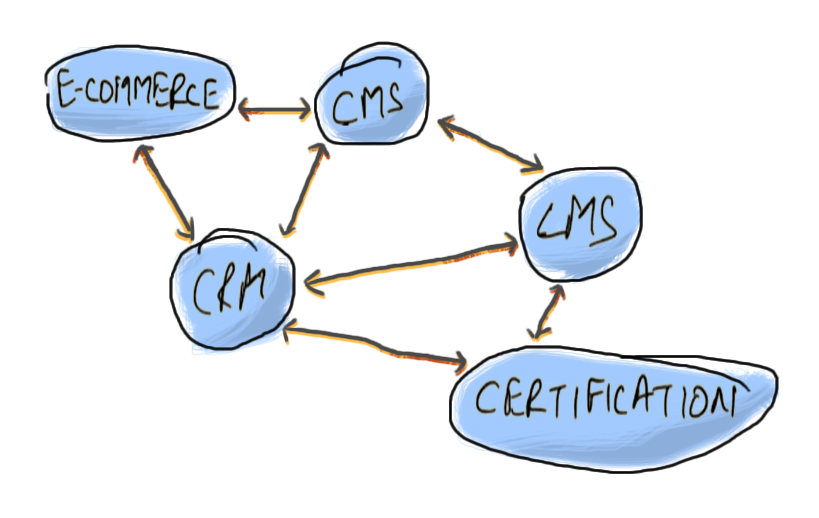
Associations are increasingly adopting multiple software systems to obtain the best of breed for each focus area. They are moving away from integrated systems that have multiple modules that manage varied IT functions but only excel in one or two. That means most associations use a multitude of IT systems – including a Customer Relationship Management (CRM), Learning Management System (LMS), Content Management System (CMS), Event Management, and Abstract Management systems. Any time a new system is introduced, it’s important that the new system integrates and “talks to” other systems already in place. In a vast majority of cases, these integrations are being developed on an ad-hoc (as needed) basis.

business-hubThat’s the reason one of the most common issues we encounter is the number of point-to-point integrations that are in place at any large association. Technically this is referred to as “tight coupling”, where systems are highly dependent on each other.
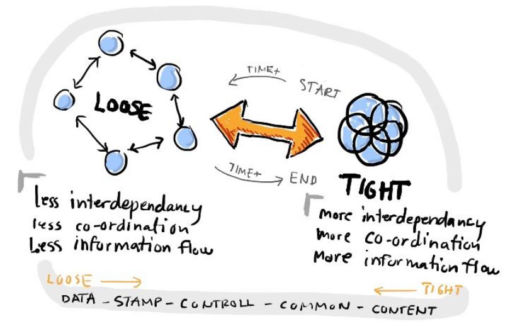
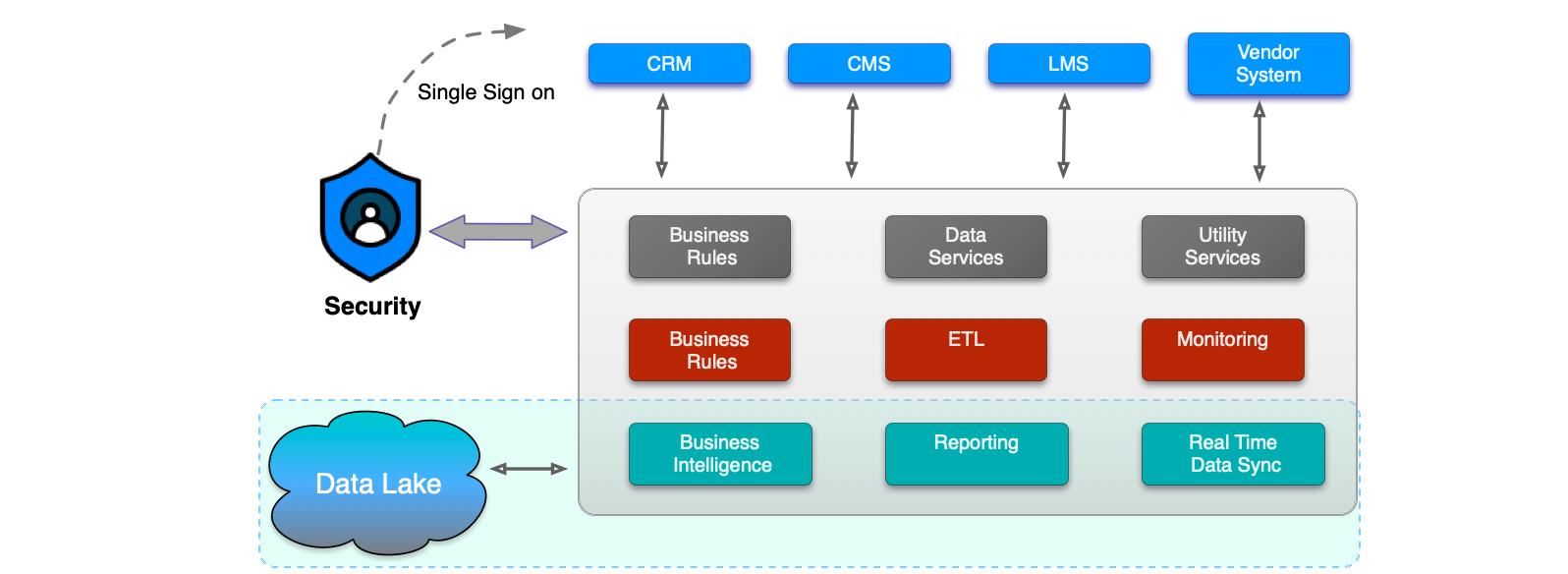

Changes in one system often require changes to multiple systems.

When implementing a new software system, migrating all of the current integrations can be a project in itself. One that involves multiple stakeholders and vendors, and is not only complex and expensive but can result in project delays and issues post-go-live. The project cost and timeline are at the mercy of multiple vendors since changes need to be made in multiple systems to accommodate any change.

One that gets us away from this quagmire is to implement loose coupling between systems. Loose coupling is a coupling technique where two or more system components are interconnected but non-dependent on each other. We can achieve this by introducing a separate integration layer that facilitates all integration across the enterprise.

business-hub

Source: Daily Fin Tech

When it’s time to change one of the systems, only the link between the integration layer and that one system needs to be re-implemented. All of the other IT systems and applications across the enterprise can continue to function as if nothing has changed.

data-lake

This is a good technical architecture to implement for future scalability and stability. But this is also a good opportunity to implement to streamline processes and to extract business value. The integration layer can also be leveraged to house business processes and enterprise data. We can put such organization-wide business rules, such as membership tiers, in one common repository – one which is owned by the organization. This way, no one vendor or system controls your data or business processes.

business-hub

For example, when customers’ membership information is saved in the CRM or AMS, any system that needs to know the current membership level of a user needs to integrate with the CRM. With an organization-wide User Data Service, any system that needs that information will just communicate with the business hub. By eliminating direct coupling with the CRM, we can also ensure the User Data Service is based on the organization’s view of a “User” and not any particular CRM’s.

In subsequent blog posts, we will explore the business hub in greater detail, and also come up with an implementation view of how this can be implemented in your association with existing tools.

Complicated Integrations Made Easy with Zapier – Part 2

Avatar photo November 19th, 2018 by

Following the Complicated Integrations Made Easy with Zapier – Part 1 article, we will now look at how we can leverage Zapier to easily build an integration with no actual coding. There are hundreds of Zapier connectors that we can use to integrate various systems together.

For the purposes of this article, we will use a simple use case – an association wants all new members to be registered for an Introductory Webinar that provides new members with a brief overview of the organization and all the benefits of their membership.  To achieve this, we will integrate GoToWebinar and Salesforce.

Following the Complicated Integrations Made Easy with Zapier


Other related use cases that can benefit from a GoToWebinar and Salesforce integration include:

  1. Users can sign up for Events from the Salesforce Member Portal, which will automatically register them to a GoToWebinar event.
  2. Users that sign up for a GoToWebinar events are automatically added to an Event in Salesforce.

How to Integrate Salesforce with GoToWebinar with Zapier

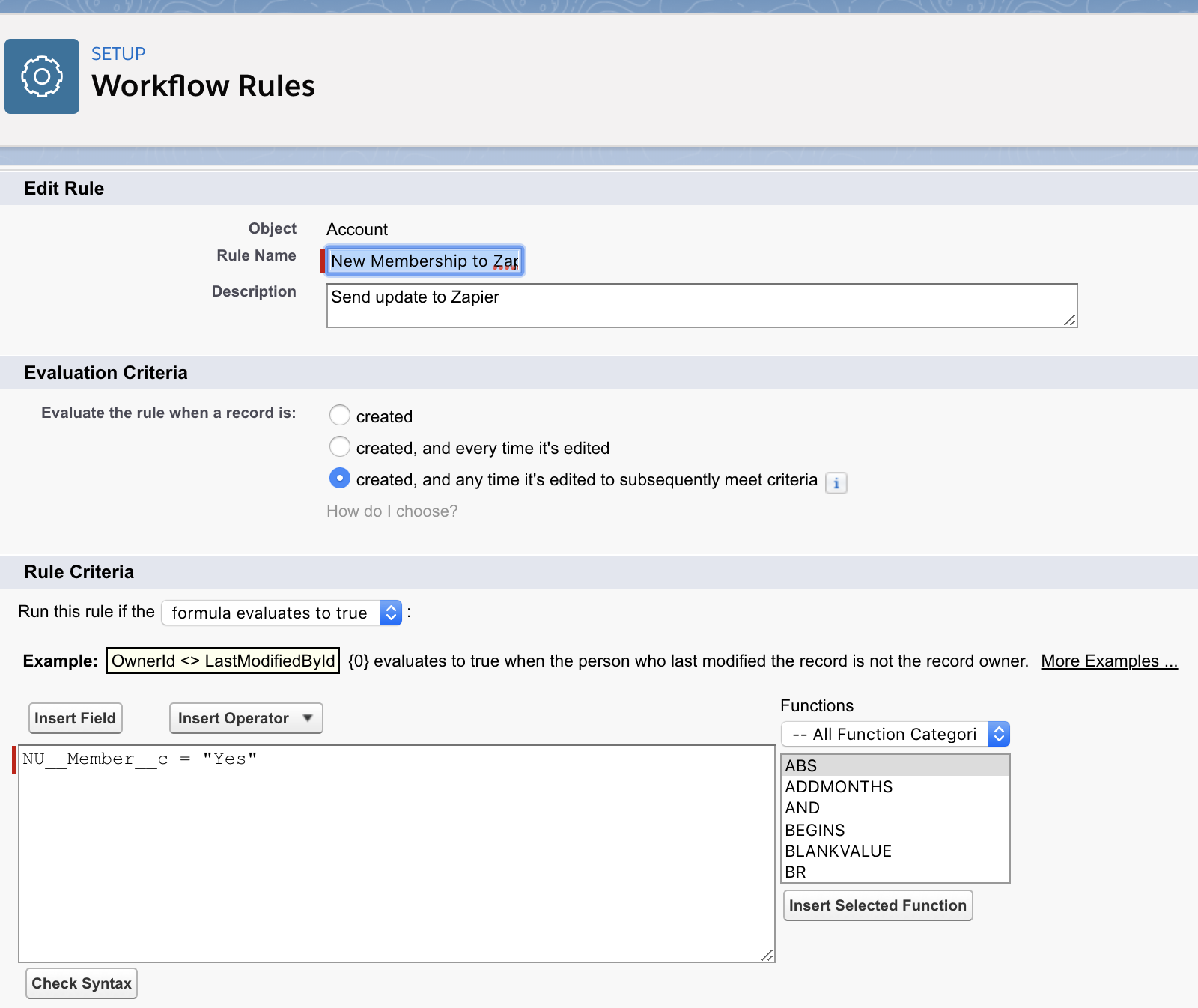
  1. Configure an Outbound Message and Workflow in Salesforce: Outbound Messages are API callouts that are triggered in Salesforce for specific events. In this case, we have configured an outbound message that Salesforce makes a call to the Zapier REST endpoint when a Membership is added to a User Object.How to Integrate Salesforce with GoToWebinar with Zapier
  2. Setup the GoToWebinar Wccount: If you already have a GoToWebinar account then you can skip this step. Otherwise, you can sign up for a new account here.
  3. Setup the GoToWebinar Webinar:  Create the New Member Webinar event in GoToWebinar.
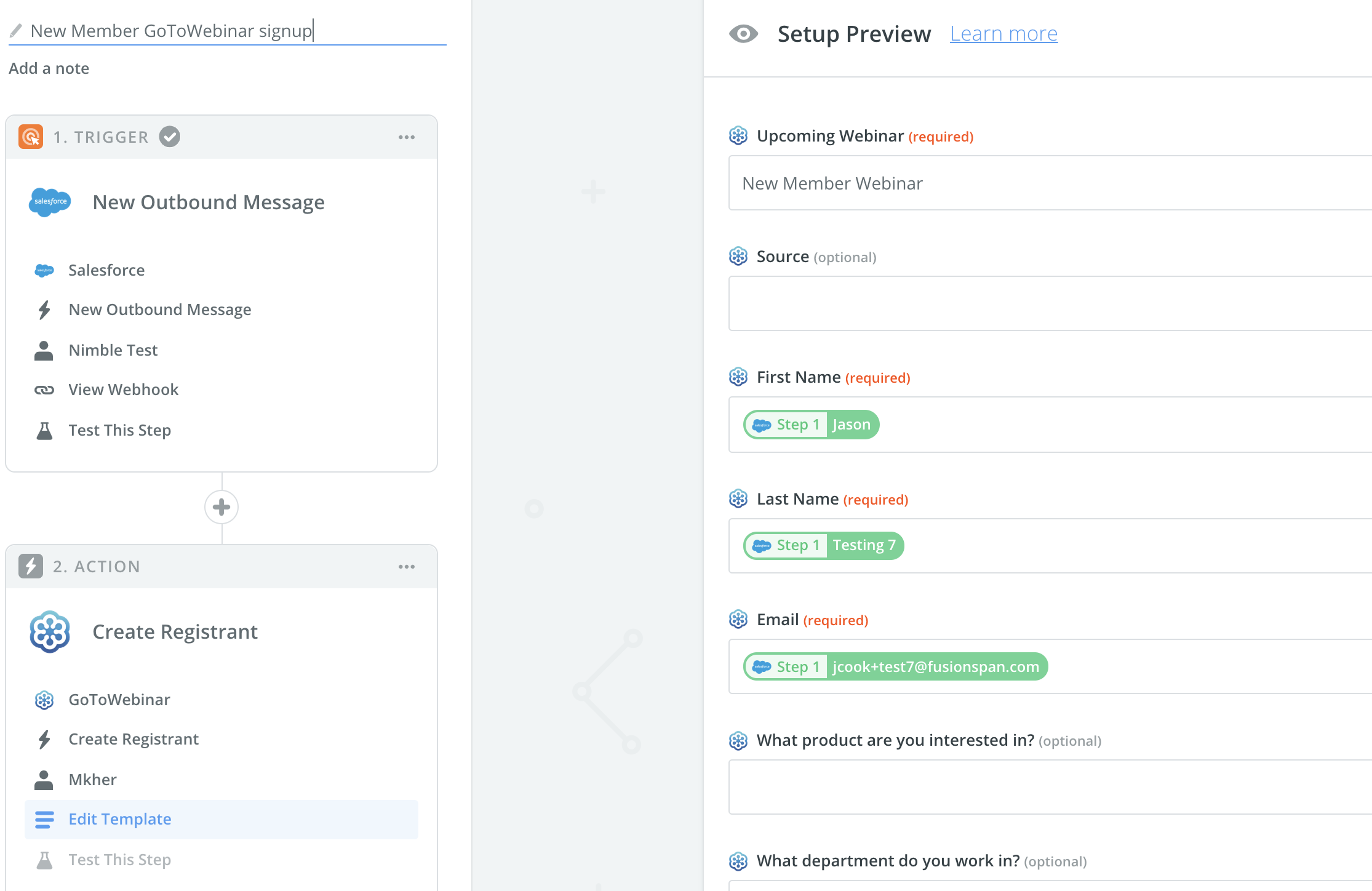
  4. Setup the Workflow in Zapier: This simple workflow in Zapier sets up a REST endpoint that will listen for inbound messages. Once Salesforce fires the outbound messages, Zapier will take the information from that message and call the GoToWebinar API and add the user to the Introductory Webinar.


Setup the Workflow in Zapier


Interested in finding other ways to integrate your Salesforce or Association Management System with your web services?  Send us a message!

Complicated Integrations Made Easy with Zapier – Part 1

Avatar photo August 21st, 2018 by

One of the most common questions we get from associations is how to integrate various applications and IT systems. Through integrations, you can copy data from one application to another, or event in one system can trigger an action in another. There are a few different ways that these integrations are usually done:

  • Built-in application support: Most applications have the capability to import/export data. Lots of newer applications also have built-in connectors that transfer information from other applications. For example, QuickBooks will connect to many different banks, allowing you to automatically import your transactions.
  • Point-to-Point integrations: You can also hire a vendor (like us!) to build integrations that tie two or more systems together. However, this solution would require a software developer and need some upkeep.
  • Integration Engines: Specialized integration software, such as MuleSoft and BizTalk, can be configured to tie different IT systems together. These robust systems are easy to configure and come with built-in components with connectors, data transformers, and filters. These integration engines scale very well and have robust features like transaction management, reliable message delivery built in. However, these do require an expert to configure and cost several thousand dollars a year in licensing costs and thus are intended for the enterprise customer. There are some open source integration engines available as well, but they will require hosting and maintenance.

A new breed of integration software is gaining in popularity. Cloud-based applications such as Zapier, IFTTT, Workflow, Microsoft Flow, automate.io are easy to use and affordable. These applications can be used to set up simple workflows and offer less customization that integration Engines can offer.

Campaigns Fontevas 23 Winter Release

In this blog series, we will use Zapier to create simple workflows and integrations between your AMS and web application. With Zapier, you can tie together any application that has an API.  If the application has a REST API, it’s even easier!

Here are some simple workflows that you can buld using Zapier:

  • New member signup would trigger an email or Slack notification
  • Member signup for an webinar event on a WordPress website would automatically register them to the event on GoToWebinar
  • When a member creates a Zendesk ticket, that interaction should be logged in the AMS
like an API call or email

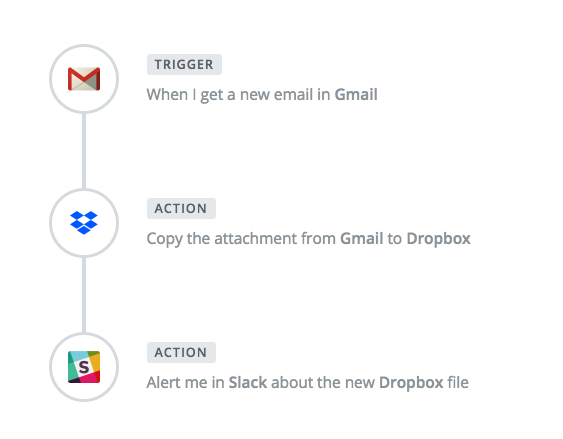
Zapier workflows are very simple to put together. Usually an incoming event (like an API call or email) will trigger the workflow.

The data received in the incoming call can then be inspected, filtered or modified.

A subsequent action can then be triggered that will perform an operation like an API callout to an external application, send an email or slack message etc.

In an upcoming Part 2 of this article, we will show actual examples of using Zapier using Salesforce CRM, netFORUM AMS, Zendesk and GoToWebinar.

netFORUM: Six questions for your next customization

Avatar photo April 12th, 2018 by

person kneeling surrounded by question marksnetFORUM Enterprise is a feature-rich system out of the box. But if your organization selected netFORUM Enterprise, they also likely selected it for the flexibility allowed through customizations. Being able to customize means you’re not dependent on a vendor’s roadmap to get the features your organization needs. That said, before you go out and hire a vendor to start adding your amazing new feature, here are five questions to consider about your customization or ask vendors.

1. What would this process look like in baseline?

netFORUM Enterprise is extremely feature-rich. With over of 20 modules, over 900 tables, and 14,000+ columns, there’s likely a lot you didn’t know netFORUM could perform without customization. Before considering any new customizations, take the time to explore what the process would look like in baseline.

This exercise process is easier once you separate the business requirements from the technical requirements. For example, say you need to generate a membership email for any membership purchased. Baseline would not allow you to attach an email to the Membership package. BUT – baseline does allow you to attach an email to a specific product, and if you only have a membership product in each package, those two processes, in essence, accomplish the same thing. If you’re willing to think outside the box with your processes, there’s a lot you can do with netFORUM out-of-the-box functionalities.

2. Will the customization be built using Toolkit or is it custom code?

Not all customizations are made equal. Building out a customization with netFORUM’s Toolkit provides an easier user interface for most changes. When implemented properly, the Toolkit allows you to minimize the need for future code changes and maximizes the baseline footprint that can be upgraded. Also, if you’re extending baseline, you may get the functionality you can reuse to your advantage – see fusionSpan’s Type Ahead plugin which leverages netFORUM’s baseline lookup definition functionality. At the same time, there are certain limitations in netFORUM Enterprise. Sometimes you’ll need a custom control or form extension. This allows you to get exactly what you want, and– particularly in eWeb– may be necessary for an optimal user experience. However, any updates to the customization won’t be simple, and you’ll need a developer for changes. Both have their trade-offs, and sometimes you need a little of both (baseline form with a custom form extension), just make sure you know what you’re getting into before you start.

3. What features will be editable and what is hardcoded?

Unfortunately, more often than not, customizations are built for the now. Which is fine, until the day after you launch when a colleague asks for one more feature or the board decides to “tweak” pricing. Taking the time to build out variability is key to long-term success and limiting costs. If your customization requires a custom code, having built-in flexibility can save you money and time. By adding in little configurations such as adding in system options, setting up tables, or web posts that can drive the customization, you reduce the need for a developer to get involved with every minor tweak. Granted, providing complete flexibility can be costly, so think through your requirements. What are areas of your solution most likely going to need to be tweaked? Prioritize flexibility around those features, and go from there.

4. What is the data structure of the customization?

From a database standpoint, where the data lives likely won’t have a big impact on the customization. Baseline field, extender column, or custom table doesn’t make a huge difference. Until you need to report on the data, and you realize that your customization has been capturing badge name on a custom table and your event name tag pulls ind_badge_name which isn’t being updated. Now you’re scrambling to reconcile Tom with T.J. Figure out early on where your data will live so you can make plans to adjust any reports pulling old data sources, anywhere data may need to be migrated, or any other potential data issues so you’re not scrambling at the last minute.

5. Who will own the code?

Defining code ownership before a vendor starts building your customization is kind of like signing a prenup – it feels a little awkward, but if things ever go south with that vendor you’ll be happy you have it. If you own the code, that means you can turn to another vendor at the drop of a hat and ask them to make changes as opposed to being stuck with a single vendor. In theory a single vendor is fine, but all organizations have turnover, and if your customization is six years old, the developer who worked on your customization left three years ago, being able to get multiple vendors to provide estimates on updating the customization will at the very least give you some negotiating leverage with your current vendor.

6. How will the customization be supported?

Once you launch, the tendency is to say you’re done and move on. Which you can, until a problem comes up. Then you have the difficult conversation of who is responsible for fixing it. While intuitively it should be the vendor, it’s never that simple. With new service packs being applied, and new features being customized, things can break, and they may require additional work that is time and material. Granted, you could sign a support contract with a vendor, but then you have a reoccurring cost related to the customization, which isn’t ideal either. The best you can do is have a clear understanding of expectations going into the process on what will be supported, when will that support end, and what the expectation is once it ends. Having that conversation at the start is always much better than coming back once you have a problem.

Conclusion

Your organization has complicated business needs, so you’ll eventually end up needing to customize. Hopefully, with these questions, you’ll feel more confident heading into conversations with a vendor next time you take the plunge.

The Dropbox Hack, and 5 Ways to Secure Passwords

Avatar photo August 31st, 2016 by
The Dropbox Hack, and 5 Ways to Secure Passwords This morning, Dropbox’s 2012 hacked data, approximately 68M customers’ password sets, were published online. There is a significant possibility that your account has been compromised, and you should change your password NOW. Like, literally right now. Take a break from this article, access your Dropbox account, update your password, and then continue reading. (more…)

Backup and Disaster Recovery for a Small Office

Avatar photo June 12th, 2015 by
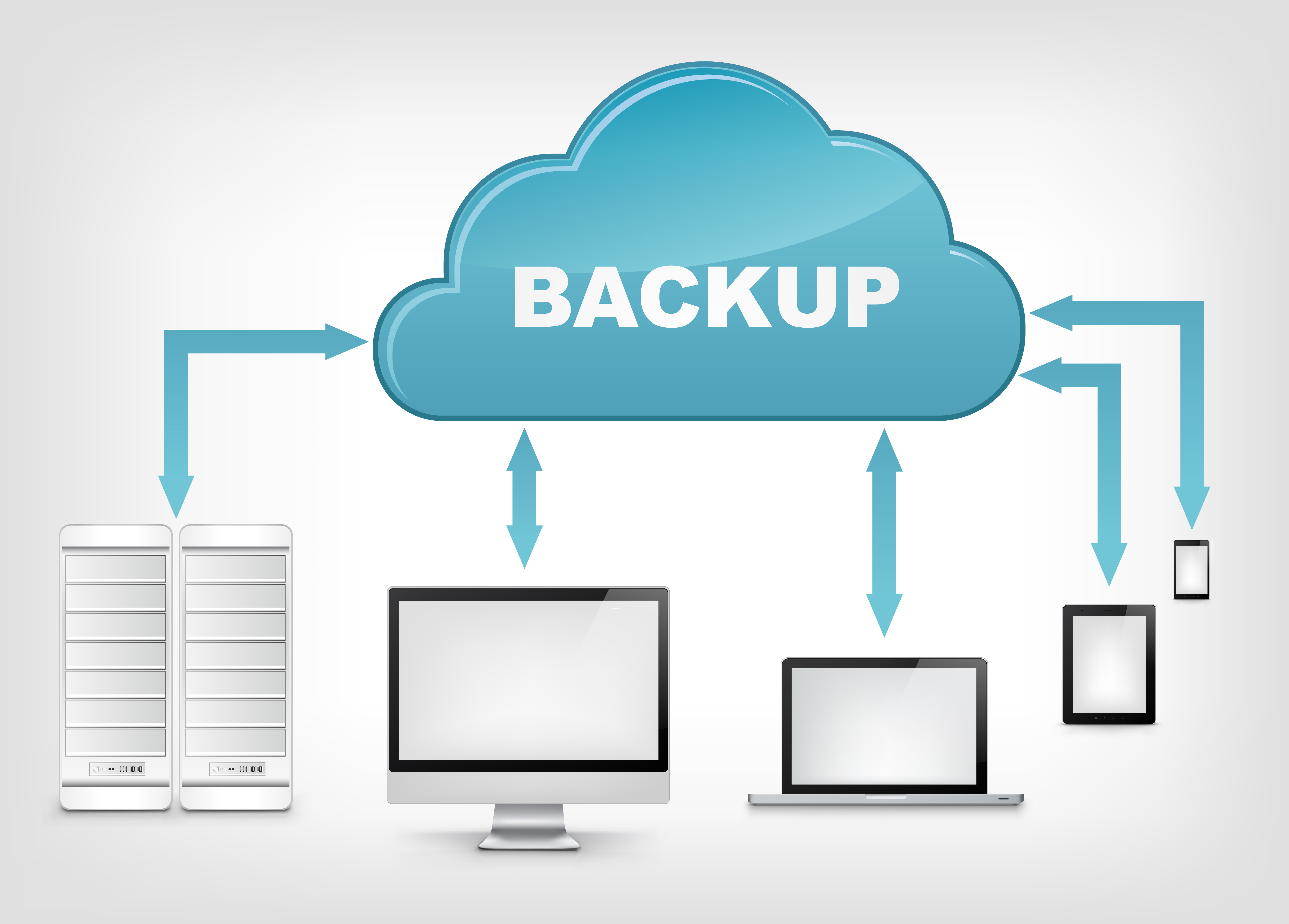
A little while back we were looking for a backup solution for our office. We have a small network of about 10 computers and it’s a mix of Mac OS X and Windows 7/8 workstations and a couple of Linux servers. Our main criteria for finding a good solution were ease of use and cost.

Backup and Disaster Recovery

Backup and Disaster Recovery

  • Ease of Use: Is important otherwise people go back to manually copying important files and not using a backup when its needed.
  • Versioning: We also wanted something that would backup individual files and keep versions of them. So for example, that important Powerpoint presentation that was in perfect shape last week, but somehow is not looking as good any more, could be reverted back to a previous version.
  • Speed: Backups should be quick, transparent, and quick to restore. Backups should happen in the background while you are working and be just as easy to restore.
  • Heterogenous: Should work with all different operating systems. We have Windows, Mac OS X and Linux users.

(more…)

Canvas LMS Third Party Authentication with SAML

Avatar photo March 12th, 2014 by
We are using Canvas LMS but want to use our own existing authentication, so our users don’t need a second set of credentials to login to Canvas. I struggled a little bit with this so thought of posting this for reference. To get Canvas LMS working with third party authentication, you really have two options

  1. Host canvas LMS yourself and just plug-in a custom authentication module. Canvas is an open source LMS solution so this should work just fine.
  2. Setup a SAML identity provider (idp) and setup your account in Canvas with SAML authentication

We chose option #2 because we were using a hosted version of Canvas. There is some documentation here on setting up various authentication profiles in Canvas.

(more…)