Order-to-payment work is a routine part of any membership team’s workload: creating orders, issuing invoices, posting payments, and handling refunds. In Salesforce, each of those steps often means a different screen. fusionCore, our membership accelerator built on Salesforce to handle core membership and financial operations, now lets staff do that work inside a Claude conversation. Interactive widgets or cards are small, clickable panels that appear in the chat. They guide staff through each task without requiring them to change windows or tools, surfacing only the required fields and buttons. Every action still runs through fusionCore’s controls and the staff member’s own Salesforce permissions.
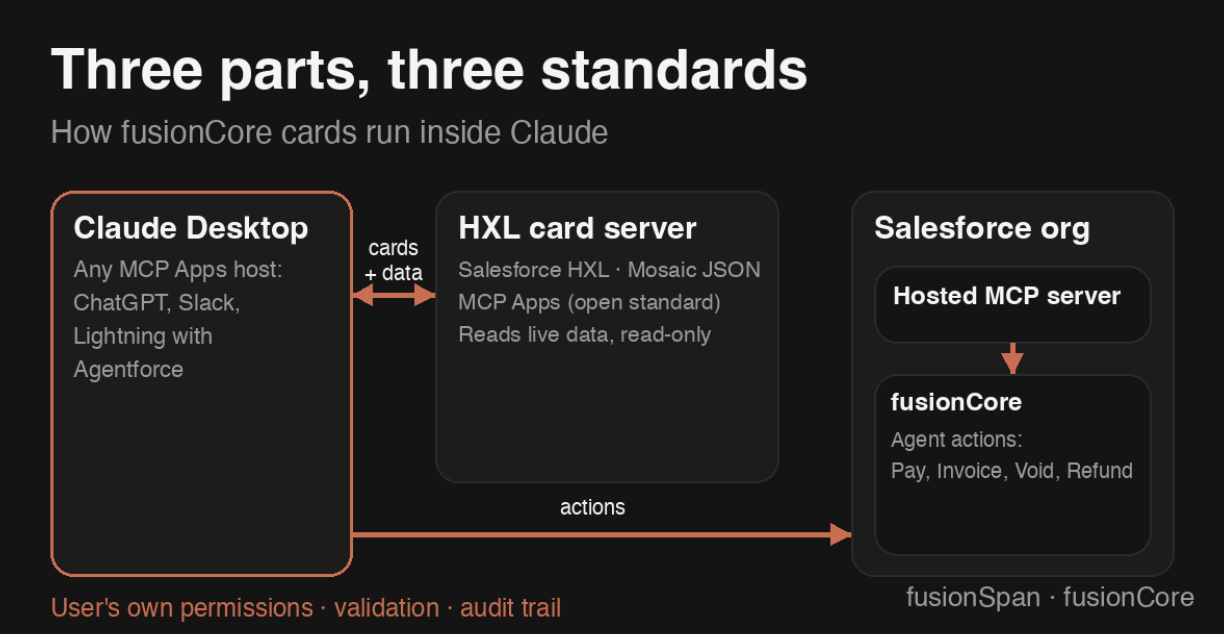
The functionality uses capabilities released at Dreamforce 2026. Following its September announcement of an expanded partnership with Anthropic, Salesforce introduced AIforce, which brings Salesforce data, actions, and permissions to surfaces including Claude, Slack, and Agentforce. AIforce runs on Salesforce’s new Headless Toolkit. The Headless Experience Layer (HXL) lets an AI agent display forms and widgets within conversations, using a widget format that any assistant supporting the MCP Apps standard can render.
What order-to-payment work looks like in Claude
A staff member types “I want to place an order,” and an order form opens inside Claude. Account, contact, business unit, and products are searched live against fusionCore, and the total updates as lines are added.
One click on Create order sends the order to Claude, which creates it and its lines in fusionCore. When staff open the order, an order card appears with the same actions as the fusionCore Order page: Pay Order, Create Invoice, Void Invoice, and Refund. Each button appears only when fusionCore would allow that action on the order. Staff can create the invoice, pick a payment term, and post it from the card.
Choosing Pay Order opens the payment card in the same window. The staff member selects Check as the payment method, enters the check number, and pays. The payment lands in fusionCore with its Financial Event, and the updated order card shows the order as paid.
Can AI agents safely process payments in Salesforce?
Yes, agents can safely process payments in Salesforce when they are constrained by the same permissions and controls already set for staff.
In this setup, the cards are the interface. They display live data and turn a staff member’s clicks into requests, but they can’t change a record. Claude, the AI agent, acts only in response to a staff member, whether that’s a click in a card or a typed message.
When a staff member clicks a button, the card sends Claude a single plain-language instruction, such as recording a $537.50 check payment on a specific order. Claude passes that instruction to a fusionCore agent action, which checks the staff member’s Salesforce permissions and fusionCore’s validation rules, performs the work, and records it in the audit trail.
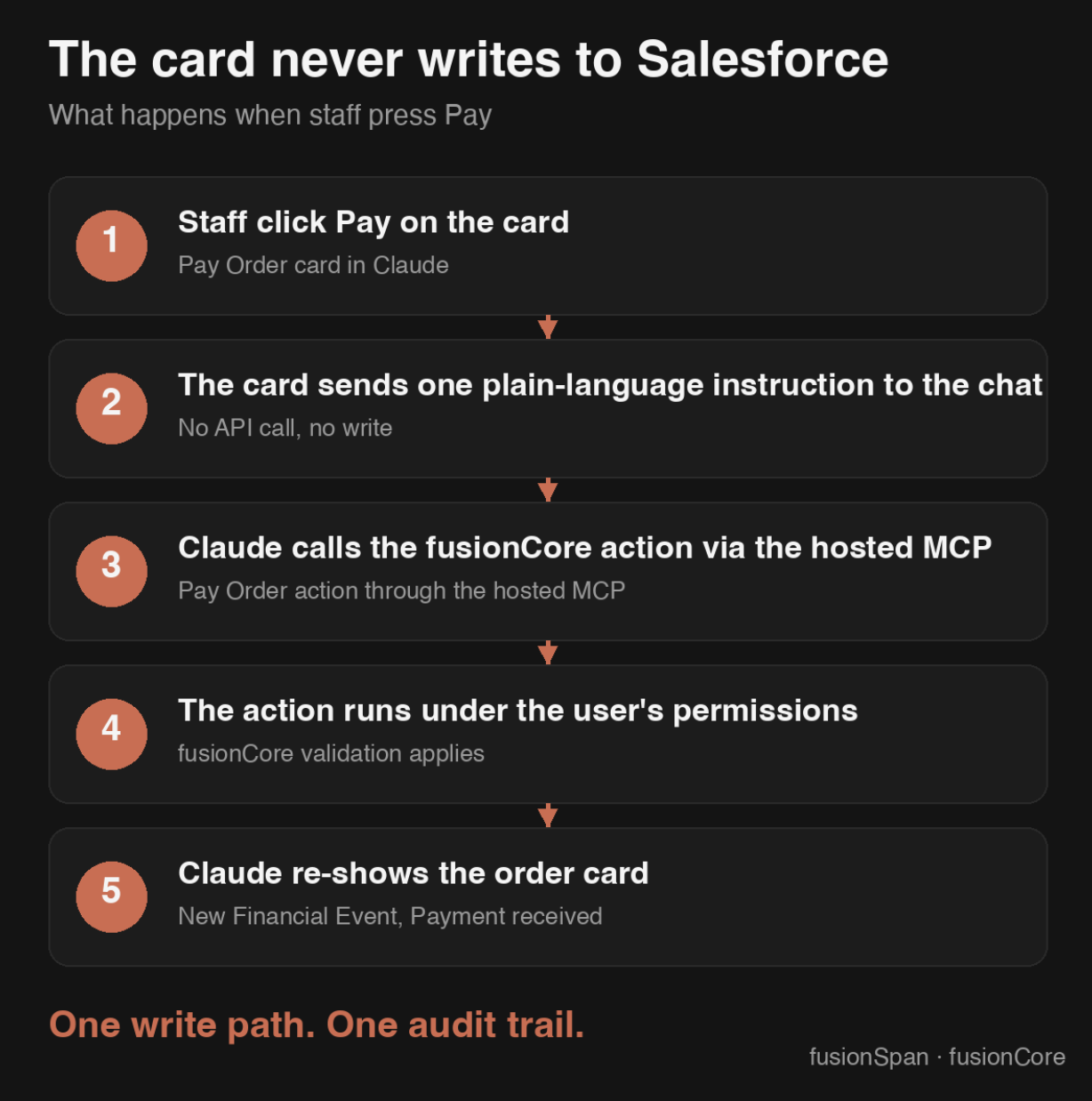
Because each action runs under the permissions of the staff member who requested it, the agent can’t do anything through these cards that fusionCore wouldn’t already allow that person to do. Finance keeps the same control it has today.
Guided steps catch errors before a payment posts
The Pay Order card shows only the payment types allowed for that business unit. It prefills the balance due, requires a check or reference number, and warns when a payment date is backdated. Staff see and correct these issues before the payment is recorded, which means less cleanup for finance afterward. fusionCore validates the payment again when it’s recorded, so the card’s checks are a convenience, but not the only safeguard.
Less Salesforce training for association staff
A chat window takes less training than the standard Salesforce interface. Staff describe what they need in plain language, and each card shows only the fields and actions that apply to the task. New and occasional users can handle routine transactions without first learning where every record and button lives in Salesforce.
Build a workflow once and use it wherever staff work
The cards are built on Salesforce’s Headless Experience Layer and the open MCP Apps standard. fusionCore’s order-to-payment cards currently run in Claude Desktop, but because the card definitions and fusionCore actions are reusable, the same workflow can be extended to Slack and other assistants that support MCP Apps, such as ChatGPT.
fusionCore was able to adopt these standards quickly because it’s built on Salesforce’s native data model. The cards query standard Salesforce objects directly, so new Salesforce capabilities are available to fusionCore customers without a structural overhaul.
How to bring agent actions into your association’s Salesforce workflows
- Pick the right tasks. Start with high-volume, rule-heavy work such as new member orders, renewals, posting payments, and refunds. Track how long each task takes today and how often it needs rework, so you have a baseline to measure against.
- Review permissions first. An agent acting on a staff member’s behalf is only as safe as that staff member’s access. Confirm that user profiles and permission sets reflect what each role should be able to do before any agent touches financial records.
- Start in a sandbox. Test agent actions against sandbox data so staff and finance can see exactly what each action does before it reaches live records. For fusionCore clients, fusionSpan deploys the agent components and connects the assistant in this step.
- Tailor the cards to your process. Labels, fields, and payment rules should match how your organization actually works. Once the first cards work, the same pattern extends to memberships, events, or credits.
- Pilot with a small group. Have a few membership services staff run the selected tasks for a set period, and compare time per task and error counts against your baseline.
- Roll out once the results hold up. Pair the rollout with brief training on the new workflow and a final permission review.
Want to see how this works on your own data? Contact the fusionSpan team for a tailored demo.

Shawn Lai
Software Developer