How to modernize a nonprofit CRM
Whether you are on the Nonprofit Success Pack, an aging donor database, or a patchwork of spreadsheets, modernizing your CRM is a chance to fix more than software. Here is how to plan it well.
 Ask Ollie
Why modernize now
Your CRM sits at the center of your relationships with donors, volunteers, program participants, and funders. When it works, staff can see the full picture of a supporter, track gifts accurately, and report on impact without a week of spreadsheet work. When it does not, data gets duplicated, reports disagree, and good decisions get harder.
For many Salesforce nonprofits, the question today is specific: should we move from the Nonprofit Success Pack (NPSP) to Salesforce Nonprofit Cloud? NPSP has served many organizations well, and Salesforce continues to support it. But Salesforce is focusing its new nonprofit capabilities, including fundraising, program and outcome management, grantmaking, and AI, on Nonprofit Cloud. Organizations that plan to grow, measure outcomes, or put AI to work should at least understand what a move would involve.
Modernization does not have to mean a big-bang project. The right plan depends on how you use your current system, how clean your data is, and what you need next.
What changes when you move from NPSP to Nonprofit Cloud
The most important thing to understand is that moving from NPSP to Nonprofit Cloud is a migration, not an upgrade. NPSP is a managed package that sits on top of Salesforce. Nonprofit Cloud is built into the core platform with its own data model, including person accounts for individuals and dedicated objects for gifts, commitments, programs, and outcomes. In practice, organizations move into a new Salesforce org and migrate their data, automation, and integrations.
That means a move is a real project with real effort. It is also an opportunity. You can retire customizations that no longer serve you, clean up years of data drift, and redesign processes around how your team works today rather than how it worked when your system was first set up.
Before you decide, inventory how you use NPSP now: your customizations, integrations, reports, and automations. Those dependencies determine the size of the lift far more than your record count does.
Signs it is time to modernize
- Staff keep separate spreadsheets because the CRM does not give them what they need.
- You cannot easily report on outcomes or show funders the impact of their support.
- Duplicate and outdated records mean nobody fully trusts the data.
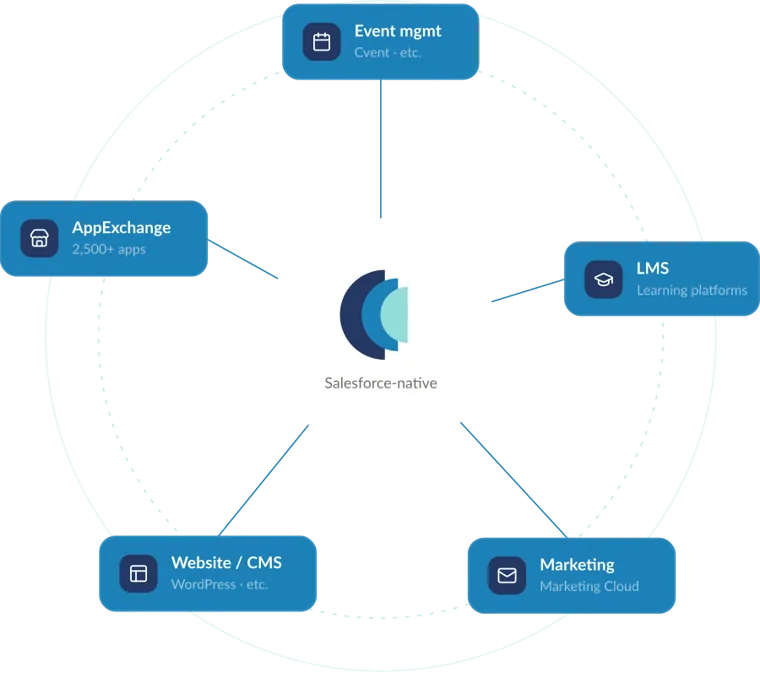
- Online giving, events, and email tools are not connected to your CRM.
- Your system was customized years ago, and nobody remembers why some of it exists.
- You want to try AI tools, but your data is not ready to support them.
Fundraising: design around your donors
Start with the donor journey, not the screens. How do supporters first give? How do you thank them, steward them, and ask again? Where do major gifts, recurring gifts, pledges, and grants fit? Mapping these journeys first makes configuration decisions much easier, and it shows where automation will save staff time.
Pay close attention to gift designations, recurring commitments, and how online giving flows into the CRM. These are where errors creep in and where reports disagree with finance. Agree early on how gifts are recorded and reconciled, and involve your finance team in the design.
Do not try to automate every touchpoint at once. Start with one important journey, measure what happens, and improve it. One of our nonprofit clients began with a single donor journey and, after adjusting their emails based on what the first round taught them, improved open and click rates by at least 8% in each metric.
Programs and outcomes: measure what matters
Many nonprofits track fundraising well and programs poorly. Modernization is the moment to change that. Decide which outcomes you need to report on, for your board, funders, and your own learning, and then design how programs, participants, services, and results will be captured.
Keep the first version simple. Choose one program, define a few meaningful outcome measures, and make data entry easy for the staff who do the work. Once that program is running well, extend the model to others. If you manage grants, either as a grantmaker or a grant recipient, map that lifecycle separately, since it has its own reviewers, deadlines, and reporting needs.
Data: clean it before you move it
Every CRM modernization is a data project. If you migrate duplicate, inconsistent records into a new system, you will have a new system with old problems. Plan time to deduplicate, standardize, and decide which historical data needs to come forward.
Just as important, set rules for how data will be collected and maintained after launch. Who can create records? What does each field mean? Who owns data quality? We have seen nonprofits where each staff member had their own way of saving information, which made migration slower and reporting unreliable. Data governance does not need to be heavy, but it needs to exist.
Clean, well-structured data is also the foundation for AI. Tools like Agentforce are only as good as the data they can read, so the work you do now pays off later. AI can also speed up the cleanup itself, flagging likely duplicates and inconsistent records for your team to review and approve.
Bring your people with you
A new CRM changes how people do their jobs every day. Involve staff from fundraising, programs, finance, and communications early, ask them what slows them down, and let them test the new processes before launch. People support what they help build.
Plan training around real daily tasks, such as entering a gift, finding a donor’s history, or running a weekly report, rather than a tour of every screen. Name an internal owner for the system and give them time to do the job. After launch, schedule regular check-ins to gather feedback and make small improvements, so the CRM keeps getting better instead of slowly drifting back into workarounds.
A practical modernization roadmap
Assess your current system
Inventory customizations, integrations, reports, and automations, and gather pain points from staff across fundraising, programs, and finance.
Set goals and scope
Decide which outcomes matter most and what belongs in the first phase versus later phases.
Design core processes
Map donor journeys, gift processing, program and outcome tracking, and grants where relevant.
Clean and migrate data
Deduplicate and standardize records, decide what history to bring forward, and test the migration before go-live.
Connect your tools
Integrate online giving, events, email, and finance so data flows to one place.
Train, launch, and improve
Train staff on daily workflows and reporting, launch with support in place, and plan regular improvements.
Questions we hear
Do we have to leave NPSP right away?
No. Salesforce continues to support NPSP. The question is whether your plans for growth, outcome measurement, and AI are better served by Nonprofit Cloud, and when a move makes sense for your budget and calendar.
Is moving to Nonprofit Cloud an upgrade?
No. It is a migration to a new data model, usually in a new Salesforce org. That is why an assessment of your current customizations and integrations should come first.
How long does a new Nonprofit Cloud implementation take?
A focused, right-sized implementation can launch in 6 to 8 weeks. Migrations from a heavily customized NPSP org take longer and should be scoped after an assessment.
What should we do first?
Start with your data and your dependencies. Knowing what you have, and how clean it is, tells you the size of the lift and where the risks are.

How fusionSpan helps
We know nonprofit work from the inside, and we specialize in NPSP-to-Nonprofit Cloud migrations. We start by evaluating your current usage, customizations, integrations, and reporting dependencies, then design a structured transition plan. For organizations starting fresh, our Nonprofit Cloud Quick Start launches a right-sized implementation in 6 to 8 weeks, starting at $30,000, with Standard, Advanced, and Premier tiers covering fundraising, programs and outcomes, and grant management.
Watch our on-demand webinar, Before You Call the Movers: Preparing for Your Migration from NPSP to Nonprofit Cloud, book a time with a consultant to talk through your migration, or ask Ollie, our AI assistant, for a quick read on where to start.
Your next step
Pick the path that fits where you are today.
Take the AI readiness assessment
Eighteen questions across six areas, with your scores shown instantly and a full report by email.
Start the assessment →Instant answersAsk Ollie
Ask about NPSP, Nonprofit Cloud, and migration timing, and get answers instantly.
Ask a question →FreeFree webinar: Before You Call the Movers
Access the recording: how to prepare for your move from NPSP to Nonprofit Cloud.
Access the recording →Paid packageNonprofit Cloud Quick Start
A fixed-scope launch on Nonprofit Cloud in 6 to 8 weeks, sized to your complexity.
See pricing →Planning a modernization or AI project?
Talk with a consultant who knows your industry.